Already a Best Buy Cardmember? You must be enjoying its $5 reward on every $100 spent, 3% Cashback on gas purchases, or 2% cash back on takeout.
With no annual fee and flexible payment options, it’s quite easy to handle and manage to avoid late fees.
However, if you’re still trying to figure out the best method to make a payment, then you’ve stumbled upon the right place.
In this article, you’ll not only explore its methods, but also learn ways to secure your account and get the most out of your card.
Why Should You Pay Your Best Buy Credit Card on Time?
You can’t miss a payment if you are already aware of the late fees and high APR that comes attached with the card.
Paying on time will always help you in the long run, whether it’s about settling a loan or building a credit score. But if you fail to pay on time, you’ll end up paying a late fee of up to $41, and high interest rates.
The Best Buy Credit card is your Visa payment card issued by Citibank, so all the transactions go through their system.
But Best Buy makes the process really simple and flexible, so you can pay the bill smoothly.
How To Pay a Best Buy Credit Card Bill? (5 Ways)
The platform offers a host of methods to make a payment. It’s up to you what you choose.
Pay Via Online
Most cardholders prefer the online because it’s quicker and more convenient, as you can use it from anywhere. All you need is the Internet and your device.
- Navigate to the citiretailservices.citibankonline.com/. It’s the official Best Buy CC page managed by Citibank.
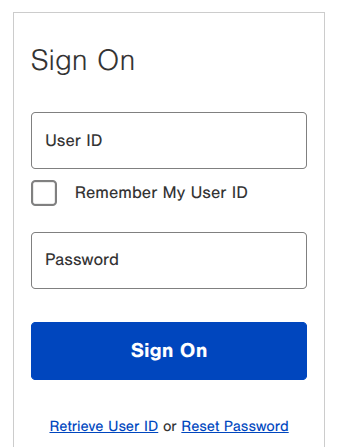
- Next up, enter your User ID and Password to access your account. You can create an account by clicking on the Get Started button if you haven’t yet.
- Once signed in, you can make a payment.
- Simply, choose your payment amount (minimum, full balance, or a custom amount), select your payment method, and pick the date.
- Review and confirm. You’ll get an instant confirmation.
You can also make a one-time guest payment without signing in —By simply clicking on Make A Payment and submitting your CC details, including Name on card, last 4-digit SSN, and phone number.
Pay Using the Mobile App
If you live on your phone, the Citibank or Best Buy app works great.
- Download or open the Citi Mobile app.
- Log in and select your My Best Buy Credit Card.
- Tap Make Payment and follow the prompts.
The app lets you check balances, view transactions, set reminders, and autopay. The app is smoother than the website when you’re on the go.
Paying by Phone
Don’t want to deal with websites? Just call.
Phone number: 1-888-574-1301
Available: Mon – Fri 9 a.m. – 9 p.m. PT and 8 a.m – 8 p.m Sat/Sunday.
Have your card number and a checking account ready for automated payment. You can speak to a representative if needed. There’s no fee for automated payments.
TTY support: Use 711 or other Relay Service. International callers can use the collect number 1-423-467-6543.
In-Store Payments
Yes, you can actually walk into any Best Buy and pay your credit card bill right there.
Simply ask a cashier to make a payment on your My Best Buy Credit Card. That’s it. You can usually pay with cash or a check. Bring your card or statement for reference.
It’s quite helpful if you want to combine shopping with bill-paying.
Via Mail & Text
Another option with some cons, but it’s still a reliable option that can refill your card. Just include your account number on the check and send it to this payment address:
My Best Buy® Credit Card Payments
PO Box 70601
Philadelphia, PA 19176-0601
The only problem with this method is that it is too slow. That said, it usually takes between 5 and 7 business days to post. If it arrives late, you might face a late fee. So you must post it before the due date.
By Text:
Text PAY to 81964 from your registered phone number linked to your account.
Follow the prompts to confirm the amount and payment source. You’ll get a text confirmation once the billing is successful.
Message and data rates may apply, and you need a payment method already set up online.
Payment Posting and Due Dates
Payments usually post the same day if made online, by phone, or in-store before cutoff times. However, mailed checks take longer, so always aim to pay a few days early to be safe.
Your due date is printed on every statement. Consider paying more than the minimum to help reduce interest faster.
A Few Things To Consider
- Set reminders or use autopay — life gets busy, and one missed payment can damage your score.
- Pay more than minimum when you can — it saves on interest over time.
- Keep records — screenshot confirmations, especially for mailed payments.
- Watch for scams — only use official Best Buy and Citibank sites and phone numbers.
- Link a checking account for faster, fee-free payments.
If money is tight one month, call customer service early. They sometimes offer flexibility or one-time waivers for first-time issues.
Common Problems and Fixes
- Payment not showing up — It can take 1-2 business days to post. You should check after a few minutes.
- Declined payment — Make sure your bank account has enough funds and no holds.
- Forgotten due date — Log in anytime to see it, or set calendar alerts.
- Technical glitches — Try a different browser, incognito mode, or the app.
- Disputed charges — Don’t withhold the whole payment; pay the undisputed amount and contact support about the rest.
Smart Ways to Manage Your Best Buy Credit Card Balance
Use the card for big purchases during no-interest promo periods, but always have a payoff plan. You can combine it with Best Buy rewards for extra value.
If you’re carrying a balance, focus on settling it before opening new lines of credit.
Many cardholders use it only at Best Buy for the 5% back, then pay it off monthly like a charge card.
You might like: How to Check a Best Buy Gift Card Balance
Best Buy Credit Card Payment FAQS
Yes. You can pay any amount above the minimum due. However, if you pay more than your interest, you can settle your balance faster.
It will levy a hefty late fee of up to $41 and possible interest charges. And consequent missed payments can hurt your credit score.
Yes, you can set up Autopay in your account’s payment section.
No, you can only use your bank account or a debit card. Using a credit card to pay a bill can result in additional fees.
You can find your CC details on your account’s dashboard, monthly statement, and on the back/front of your card.
Wrap Up
Making your My Best Buy Credit Card payment is no brainier, as you only need the Internet and a smartphone.
You can also use your phone or use a traditional way, like the post mail, depending on what’s convenient for you.
However, it doesn’t matter which method you pick; you have to be consistent in paying bills, or you can end up spending more than usual.
You can remove the load of manual payment by setting up autopay in your account. It takes a minute or two to set up Autopay, but it can save you from missed bills.
And if stuck on anything, you can reach out to their customer support and ask them to resolve your issue.