Are you spending too much cash that your Best Buy Gift card has started to show an insufficient balance? I’ve got your back.
If you’re not sure about how much cash is left in your wallet, then you must learn to check to avoid surprises and failed transactions.
It’s easier to keep tabs on your balance online, as it just shows with a click of a button.
In this article, I’ll walk you through all the best methods and some tactics to get the most out of your gift card.
So, without any further ado, let’s barge forward.
Why Should You Check Your Best Buy Gift Card Balance?
It’s always a good idea to keep tabs on your gift card balance, so you don’t encounter transaction failure or unusual surprises. Besides, it will help you budget accordingly for future purchases.
So apart from building good habits, it will also save you from an insufficient balance that you could face when purchasing your favorite item.
Anyway, with Best Buy, it’s almost no brainier to check your gift card balance. You don’t need to access your account in most cases, as most platforms compel you to log in.
And the process is quite safe, whether you’re using a physical card or an e-Gift card. So, now you must explore its ways.
How To Check Your Best Buy Gift Card Balance?
You get a host of options to monitor your Best Buy gift card funds. You can choose any one that fits your needs. However, if you want to go with the fastest, yet most convenient way, the online is the best choice. Let’s outline all the major options here.
Via Online
As mentioned already, it’s the most convenient method that works across all devices. However, it’s not the fastest option, but it roughly takes a minute or two.
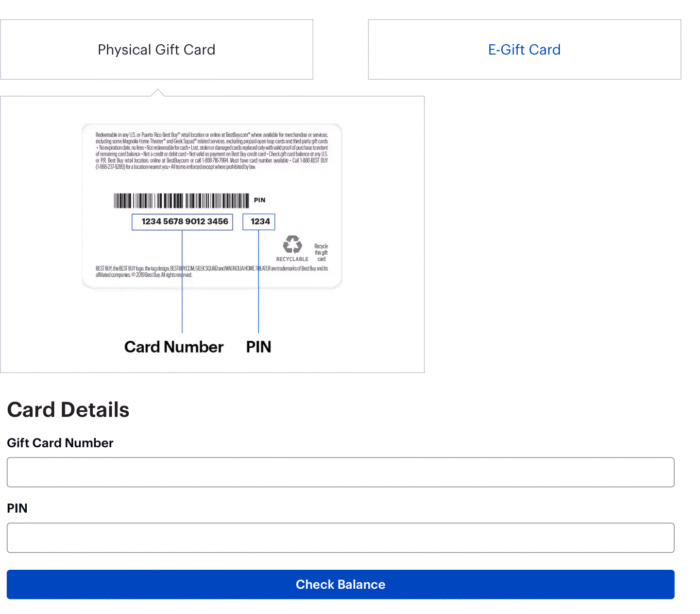
- Head over to the Best Buy gift card balance page. You’ll see the Card Details boxes.
- Simply, enter your 16-digit Card Number and 4-digit PIN. You can find your card details on the back of your card. The process is the same for the e-Gift card, too.
- Next up, click on the “Check Balance” button.
- You’ll see your available gift card balance right on the screen.
Login required? no. But if you access your account, you can get more flexibility and control.
Via Mobile App
It’s the fastest and most convenient method on the go. Unlike Online, it shows your balance at the click of a button.
- First off, open the Play Store or App Store and search for the Best Buy app.
- Download it and launch it. Log in to your account or create one if you don’t have one.
- Once you log in. Navigate to the Account tab, which is usually at the bottom of the screen.
- Look for Gift Cards and tap Check Card balance.
- If you’ve already linked your gift card, you have to tap on the button to see your funds.
It enhances the user experience because it doesn’t require entering details manually.
Many people prefer the app because it feels more integrated with their shopping experience. You can browse products and keep tabs on your funds hassle-free.
Calling Customer Service
Relying on the internet is not always practical. You should go back to the older methods, even though they’re not fast and convenient. Calling a customer support team is one of the best ways to get your balance checked.
- Call at: 855-820-0485. 8-11 PM ET, 7 Days available.
- Or email cashstarsupport@bhn.com.
Make sure you’ve your card details ready with you. Someone from the customer team will connect with you and help you check your funds.
Via In-Store
Well, if you often visit a retail store? You can check your funds right there.
All you need is your Best Buy gift card, and hand it over or show it to a cashier. Kindly ask them to check the balance the card holds before checking out.
It’s also necessary to check it to avoid a transaction failure.
Note: Some retailers may ask you for your ID to prevent fraud, especially if the funds are large.
Physical vs. e-Gift Cards for Balance Checks
Physical Gift Cards come in plastic form, often bought in-store or online with shipping. The number and PIN are printed on the card. Scratch the PIN area carefully—once revealed, it’s exposed.
E-Gift Cards are digital, delivered by email. It functions similarly, but you have to copy it from the email. Make sure you don’t delete the mail until you’ve used up your funds.
Both formats are the same, but e-Gift cards may have a different support number.
Safety Tips
- Never Share your PIN: Never give it to any random person. Keep it safe, and always use your personal device to save it locally or in the cloud.
- Check regularly: Balances don’t show transaction history easily online, so note your starting amount and purchases mentally or in a note app.
- Expiration and fees: Most Best Buy gift cards don’t expire, but always confirm. No inactivity fees either, which is a big plus.
- Multiple cards: You can merge your cards and make a payment at checkout.
- Browser issues: Try in Incognito mode if you can’t access the site. Also, clean up the cache and cookies for smooth less experience.
- Security: There are tons of websites that claim to be the Best Buy site. Make sure you enter the official site to avoid theft issues.
Common Problems And Fixes
Things will not always be in your favour. So here are the major reasons.
- “Invalid card” message: It’s the most common problem that stems from entering the incorrect credentials. Double-check your details and try again.
- Outdated Balance: It might take some time to refresh your balance. So keep patience and check it in a few minutes.
- Card not recognized: If recently purchased, you might need to activate it with the help of a support team.
- Lost or stolen card: In case your card is lost, report it right away to the customer support. They can sometimes freeze the balance and deliver you a new card with the remaining balance.
How To Use Your Best Buy Gift Card Balance Smartly
Now that you know how much you have, make sure to make the most out of it. Best Buy holds many deals and offers price-matching and bundling services.
If applicable, use your balance along with any coupons or rewards program.
In case the balance is low, it would be better to put it towards accessories or additional components.
Many people end up adding it to their credit cards for the rest of the payment.
Best Buy Gift Card FAQs
PIN is necessary online or via apps because it verifies your card and keeps it from being used.
No, it doesn’t. You can use the app or online to monitor your funds multiple times in a day without any issues.
Unfortunately, you can’t see your full online history. You have to keep your own records by taking screenshots or asking in-store during checkout.
If you haven’t used your funds, then it is certainly a technical glitch that’ll solve itself in a few minutes. However, if it’s still there, you can take a screenshot and show it to the customer care team. They’ll fix it in no time.
No. Best Buy gift cards are non-transferable and non-refundable for cash. You can only use it for purchase, store-wide.
Wrap Up
Finding out the balance of your Best Buy gift card can actually be easy and fast. There are various ways to do so, including the online checker, the mobile app, giving a quick call, or even visiting the store.
The important thing here is to ensure you get the balance of your gift card before you go shopping to avoid getting caught by surprise.
Consider your gift card as an equivalent of cash by checking its balance, protecting yourself, and making use of it without any restrictions in terms of getting whatever you desire at Best Buy.
Every time you receive a gift card, make sure you check the balance before shopping, and if it does, save this guide or the official one for future use.