You’ve got a Domino’s gift card sitting around. Maybe someone gifted it to you, maybe you bought one for yourself during a deal, or maybe it’s been in your wallet so long you forgot the balance.
Either way, you’re here because you want to know what’s left on it before you go ordering a large pepperoni and three lava cakes.
The best part? Checking your balance takes about two minutes. There are three ways to do it, and I’ll walk you through all of them so you can pick whichever one makes sense for you right now.
Here’s How To Check Your Domino’s Gift Card Balance
Let’s be honest — most people just want the fastest method. I’ve put them in order from quickest to slowest, though “slowest” here still means under five minutes.
Check Online (Quick)
This is the one most people use. No app, no phone call, no leaving the couch.
Here’s what you do:
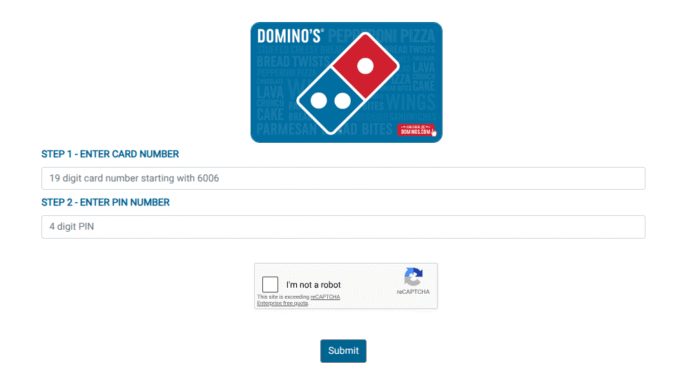
- Head directly to the wbiprod.storedvalue.com/. This site provides infrastructure to the major retailers.
- Next, enter your 19-digit gift card number that starts with 6006 and your 4-digit PIN. You can find your credentials on the back of your card or in the mail.
- Once you’ve confirmed your details, solve the captcha and tap the Submit button.
- Now, you can see the balance on the screen immediately.
Jot down the fact that if you’re already planning to make a purchase online, all you have to do is use your gift card when making the payment, and the system will automatically show how much money you have left on your card.
Therefore, if you were planning to buy some pizza, forget about checking your balance and use the gift card!
Check Through the Domino’s App
If you’ve got the Domino’s app on your phone, this works the same way as the website — just a different screen.
- Open the app and access your account using your Email and Password.
- Tap your account icon or navigate to Payment Methods.
- Select Gift Card.
- Enter your card number and PIN, and your balance will appear on the screen.
This app also allows you to save the gift card, and it will automatically appear at checkout. So it’s quite useful if you plan on using the card multiple times.
Call Domino’s Customer Support
Not everyone wants to mess with websites or apps. If that’s you, just call at 1-734-930-3030.
Make sure that you have the card details ready before calling. The whole conversation should take less than two minutes unless you call on a Friday evening when they are busy serving dinners.
Check In-Store
Also, you can visit the nearest Domino’s restaurant and ask for assistance from the person who works at the cash register.
They will be able to check your remaining funds using the information stored in their database. If your scratch-off PIN is not readable, that might help.
What to Do If Your Balance Is Lower Than Expected
This comes up more than you’d think. You swear you had $30 on that card and now it’s showing $14.
A few things could explain it:
Previous orders you forgot about. If the card has been used before, the balance reflects all past spending. Check your order history in the app or website to see if there were charges you didn’t remember.
A partial charge. Sometimes people use a gift card for part of an order and pay the rest with a card. The gift card gets partially drained, and people forget that it happened.
Inactivity fees. Currently, there are no dormancy fees on Domino’s gift cards; however, things can change at any time. However, if your card is several years old, it’s worth calling support to confirm.
The card was already registered and used. If you received a used card from someone, you can reach out to the customer support and show them your purchase receipt. They’ll investigate the issue further.
Can You Reload It?
Yes, you can. Domino’s gift cards are reloadable, which is useful if you eat there regularly or want to keep a set amount of “pizza money” on a card for budgeting purposes.
You can reload online, through the app, or in-store. The minimum reload amount is typically $5, and the maximum balance you can carry on a single card is $500. Worth knowing if you’re thinking of buying one as a long-term thing.
What If You Lost the Card but Remember the Number?
If you’ve saved the card details on anything, whether it’s photos, notes, or an email receipt, you’re fine. Like any other gift card, Domino’s cards are tied to the number, not the physical card. You just need to enter the number along with the PIN as usual.
If you lost the card and don’t remember the details, it’s hard to recover. So, you must take the photos of both sides or jot down the credentials on any paper and store them safely.
Using Your Gift Card When Ordering
When you’re ready to actually place an order, applying the card is simple:
- Online or app: At checkout, select “Gift Card” as your payment method, enter the number and PIN, and it applies the balance automatically. If the order is more than the card balance, you’ll be prompted to add another payment method for the difference.
- In-store: Just hand the card to the cashier or tell them the number.
- By phone: Tell the person taking your order you’d like to pay with a gift card and give them the number and PIN.
One heads-up: Domino’s gift cards work at participating locations in the US. If you’re traveling or ordering from a location outside the US, the card might not be accepted.
International Domino’s locations are franchised separately and often don’t share the same payment system.
FAQs
Yes, there is no need to have an account to view your balance online. However, the process will be quick and smooth if you access the account. Anyway, you can also call the customer support and check without an account.
Domino’s gift cards never expire. You may keep them for as long as you want and redeem them anytime. Additionally, there are no inactive account fees, meaning that if you don’t use it for a year, its balance remains unchanged.
It might happen. The best thing you can do is contact customer support at 1-734-930-3030. You should give them your card number as well as any proof of purchase that you might have. This may sometimes allow them to verify the PIN via their system.
Yes, that’s exactly how people do it. Just pick the “gift card” option at the payment section of the Domino’s website and app. Enter your gift card number and its PIN, and you will be good to go. In case the total amount exceeds the balance of your gift card, you may just split the payment.
Unfortunately, you cannot transfer between Domino’s gift cards. If you want to consolidate balances, you can only do that by using them on separate orders.
No. You can use whatever remaining balance is on the card, even if it’s just $1.47. It’ll apply that amount toward the order, and you’ll pay the rest with another method.
No. Gift cards are valid for use only on the total order. Tips for delivery drivers are separate and need to be paid with cash or another payment method.
Wrapping Up
Checking your Domino’s gift card balance is a no-brainer — three methods, all of which take under five minutes. Online is the fastest, the app is convenient, and calling by phone works if everything else is not working.
The one thing I’d say before you close this tab: if you’ve got a gift card with an unknown balance, go check it now. Not because it’ll expire — it won’t — but because people forget about gift card money all the time, and that’s essentially free pizza sitting there doing nothing.