You’ve got a Sephora gift card. Maybe someone gave it to you for your birthday. Maybe you bought one for yourself as a way to budget your beauty spending.
Either way, before you start filling up that cart with skincare, makeup, or fragrance, you need to know one thing — how much is actually on it?
Checking your Sephora gift card balance is quick, and there’s more than one way to do it. But this guide covers more than just the balance check.
You’ll find out what this card actually is, how to use it properly, tips that save you from awkward checkout moments, and answers to the questions most people Google but rarely find explained clearly. Let’s get into it.
How to Check Your Sephora Gift Card Balance
There are three main ways to check your balance. Pick whichever one fits your situation.
Check Online
- Navigate to Sephora.com gift cards page.
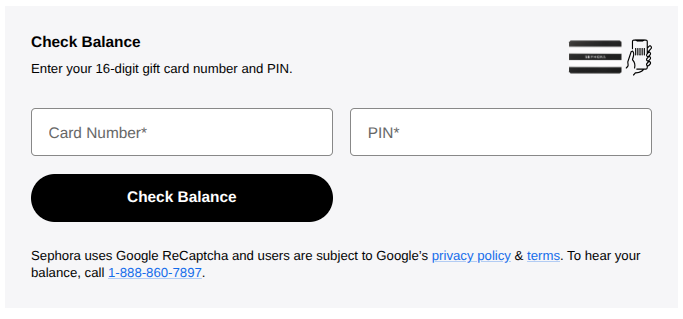
- Now scroll down until you see the Check Balance boxes like the image above.
- Next up, enter your 16-digit gift card number and PIN printed on the back of your card. If you have an e-Gift, look in your mail.
- Once you click the Check Balance button, you’ll see your funds instantly on the screen.
Best of all, you don’t need to sign in, as all you need is your card credentials to see your funds.
Check In-Store
Walk into any Sephora store and make your way to the checkout counter. You don’t have to purchase anything; just give them your card, and they’ll let you know what the balance is.
If your scratch-off PIN strip has been tampered with, and you no longer have the PIN, this method works best. They might be able to find a different way to look up your balance.
Call Customer Service
Sephora’s customer service line is 1-877-737-4672. Call them, have your card number and PIN ready, and they’ll pull up the balance for you.
However, it’s the slowest of the three options, but it works when the website is down or you’re having tech trouble.
Check Through Your Beauty Insider Account
If you’ve registered your gift card to your Sephora Beauty Insider profile, then there is another way for you to see your gift card funds.
Just log in to your Sephora Beauty Insider account via mobile application or the website and navigate to the “Payment Methods” section under the Account tab. Just tap on your linked gift card to show your balance.
This is a very convenient way, especially when using the gift card in small amounts over several purchases.
A Few Things To Consider
Check your balance before you get to the register, not during. Finding out mid-transaction that your card has $6 left instead of $60 is uncomfortable for everyone involved. Two minutes of prep saves that moment entirely.
Here’s something a lot of people don’t realize: Sephora gift cards don’t expire.
There are also no inactivity or maintenance fees. So if you found a card tucked into an old birthday card from three years ago, the money should still be there. Pull it out and check.
If your balance is lower than you expected and you haven’t used the card, contact Sephora customer service right away. Have your receipt, your original purchase confirmation email, or any proof of purchase ready — it helps them investigate faster.
One more thing: if you get a gift card as a present, register it to your Beauty Insider account as soon as you can.
If the physical card gets lost or stolen, an unregistered card generally can’t be replaced. A registered one has a better chance.
What Is a Sephora Gift Card?
It is a prepaid card that you can use as a debit card at Sephora. In this case, some money will have been preloaded onto the card for you to use. However, there are a few things worth knowing before you use one.
Physical vs. digital. Physical Gift Cards refer to the original plastic cards. You can buy them from the Sephora stores and other retail chains. On the other hand, e-Gift Cards are digital cards that are delivered to your email address. They work the same way.
Amounts. You can load between $10 to $500 only at the time of purchase, depending on your monthly beauty budget. Yes, some people use them as a budgeting tool — instead of putting beauty purchases on a credit card
Not reloadable. Unlike a debit card, it’s one-time loadable. That means you cannot refill any amount after the purchase, as there is no reload pay button on the Sephora website. So, if your balance hits zero, the card has no value.
Where they work. You can only use them at the Sephora stores across the US and on Sephora.com. However, even some regions don’t accept such cards, so check with your location before visiting a store.
Why buy?. You can buy them for yourself or give them as a birthday present or holiday gift. However, they’re quite practical if you’re a beauty lover and want to set a budget for shopping at the Sephora store. Best of all, they’re safe.
How to Use a Sephora Gift Card
Using your gift card is straightforward, but a few specifics depend on whether you’re shopping in-store or online.
Using It In-Store
When you’re ready to pay, tell the cashier you’d like to use a gift card. Hand over the physical card or show the barcode on your phone (for digital cards). The cashier will scan it and apply the balance to your total.
If your purchase costs more than your gift card balance, you pay the remaining amount with another method — credit card, debit card, or cash. Sephora lets you split the payment without any issue.
Using It Online
At checkout on Sephora.com, look for the “Redeem Gift Card” option on the payment page. Enter your card number and PIN, then click apply. The balance gets deducted from your order total immediately.
If the total is more than the card balance, you’ll add a second payment method for the rest. You can also stack multiple gift cards in a single transaction — just apply them one at a time.
Using It on the Sephora App
The app checkout works the same as the website. On the payment screen, select “Gift Card” and enter your details. Clean and simple.
A Few Rules to Know
- Gift cards can’t be used to buy other gift cards. That’s a standard restriction across most retailers.
- They can’t be returned for cash. If you decide you don’t want a gift card, Sephora won’t refund it as cash.
- If you return a purchase you made with a gift card, the refund goes back onto a new gift card — not the original one.
- Gift cards can’t be applied to previous orders retroactively. They only work at the time of checkout.
FAQs
Sephora has mini-shops within Kohl’s stores. But Sephora gift cards can be used only at the stand-alone Sephora stores and Sephora.com and not at Kohl’s counters.
If you shop from the Sephora area of a Kohl’s store, you will have to make payments through the Kohl’s payment process, which cannot accept Sephora gift cards.
You can split the payment too. All that you need to do is pay the remaining amount using another payment method, such as credit cards, Paypal e.t.c..
Not at all. You only pay the one-time fee at the time of purchase. You just need to reload the funds on your card and can use it the right way.
Unfortunately, you can’t use Gift cards as the payment method to pay for your subscription orders. So you cannot use a credit card or bank account to set up your recurring payments.
Wrap Up
The process of using a Sephora Gift Card is quite straightforward once you learn the basics.
You can check the balance on your card anytime before making any purchases, whether you’re shopping online, in retail, or by phone.
Make sure to register the card with your Beauty Insider account to avoid losing the balance if the card is lost.
When you want to use the gift card, there’s flexibility at checkout, whether you shop offline or online via the website and mobile app.