If you’ve got a TJX Rewards credit card sitting in your wallet, you already know the perks — no annual fee, 10% off your first purchase.
On top of that, reward points that stack up fast when you shop at T.J. Maxx, Marshalls, HomeGoods, Sierra, and Homesense. But keeping those perks intact means one thing: paying your bill on time, every time.
The good news? TJ Maxx makes it pretty easy. Whether you’re a fan of doing things online, prefer picking up the phone, or still trust the postal service, there’s a payment method that fits your style.
This guide walks you through every step of making a TJ Maxx credit card payment online — plus covers all the other ways you can pay, so nothing slips through the cracks.
What Is the TJ Maxx Credit Card?
The TJX Rewards Credit Card and the TJX Rewards Platinum Mastercard are both issued by Synchrony Bank.
That matters because when you log in to manage your account or make a payment, you’re going through Synchrony’s portal — not a TJ Maxx-branded page.
There are two card versions. The standard TJX Rewards Credit Card works only at TJX-family stores and websites.
And the Platinum Mastercard works anywhere Mastercard is accepted — including ATM cash withdrawals, which the basic card doesn’t support.
Both cards earn you reward points, and both carry a high variable APR (hovering near 30%), so carrying a balance month to month isn’t something you want to make a habit of.
How To Make a TJ Maxx Credit Card Payment Online
Online bill pay is hands-down the fastest and most flexible way to handle your TJX bill. Here’s how to set it up from scratch and make your first pay.
Step 1 — Register for an Online Account
If you’ve never logged in before, you’ll need to register first. Head over to tjx.syf.com — that’s the Synchrony Bank portal for TJX cardholders.
On the login page, look for the option that says “I Want To Register or Apply” on the left side. Click it, and you’ll be asked for your credit card account number and your billing ZIP code.
Follow the on-screen prompts from there — it only takes a few minutes. Once you’re set up, you’ll have access to your full account dashboard, payment history, e-statements, and due date alerts.
Step 2 — Log In to Your Account
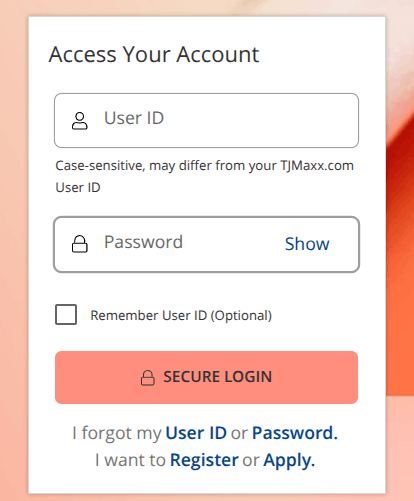
Already registered? Just enter your User ID and password on the same page at tjx.syf.com and hit SECURE LOGIN.
If you forgot your User ID, click “I forgot my User ID,” enter your account number and ZIP code, and follow the prompts. Same process for a forgotten password.
Once you’re inside your account, find and click the “Make a Payment” button. It’s typically right on the dashboard or under the account summary section — you won’t have to dig for it.
Step 4 — Choose Your Payment Details
Here’s where you make three key decisions:
- How much to pay — You can pay the minimum due, the statement balance, the current balance, or a custom amount. Paying the full statement balance each month is the smartest move given the card’s high APR.
- When to pay — Schedule it for today or set a future date.
- Where the payment comes from — Link your bank account using your routing and account numbers.
Step 5 — Confirm and Submit
Review everything, then hit submit. You’ll get a confirmation on screen and likely a confirmation email too. Save that for your records.
How To Pay a Bill Without Signing In?
Don’t have an online account and don’t want to create one? No problem. Synchrony gives you a guest payment option.

On the login page at tjx.syf.com, look for the “PAY AS GUEST” link. Click it, then enter your credit card number, the last four digits of your Social Security number, and your billing ZIP code.
From there, follow the prompts to complete your billing. It’s a decent one-time option, but if you’re paying regularly, setting up a full account saves you a lot of repetitive data entry.
Setting Up Autopay
If you’re the type who’d rather set it and forget it, Synchrony’s autopay feature is worth turning on.
Once you’re logged into your account, navigate to the autopay settings and choose the amount you want automatically deducted each month — minimum payment, full balance, or a fixed amount. Then link your bank account and confirm.
Autopay is a solid safety net, but keep an eye on your account anyway.
However, unexpected charges or billing errors can happen, and autopay won’t catch them for you.
Other Methods
Online isn’t the only game in town. If you prefer to pay in a different way, TJ Maxx (through Synchrony Bank) offers a few solid alternatives.
Via The TJ Maxx App
Yes, there’s an app for that. If you’re more comfortable on your phone than on a desktop browser, the T.J. Maxx mobile app lets you log in with your User ID and password and make payments directly from your phone.
The steps mirror the online portal — you choose the amount, date, and funding source, then confirm.
A bonus: the app also lets you track your TJX reward certificates, which show up within 48 hours of being earned.
If you link your bank account directly to the app, you can even pay for purchases right at checkout, keeping your balance at zero before interest kicks in.
Pay by Phone
Call the customer service number on the back of your card. If you have the TJX Rewards Credit Card, dial 1-800-952-6133. For the TJX Rewards Platinum Mastercard, the number is 1-877-890-3150.
Once you call, you’ll be guided through an automated system. Have your credit card account number ready, along with your bank routing number and account number — or your debit card if you want to pay that way.
The automated system is free to use. However, if you ask to speak with a representative for an expedited payment, a fee will apply, so plan ahead and avoid last-minute calls if you can help it.
Pay by Mail
Old-school, but it works. Write a check or get a money order for at least your minimum payment due — do not send cash.
Simply include the payment coupon from your monthly statement so Synchrony can correctly apply the payment to your account.
Mail it to the right address, depending on which card you have:
- TJX Rewards Credit Card: P.O. Box 669818, Dallas, TX 75266-0772
- TJX Rewards Platinum Mastercard: P.O. Box 669819, Dallas, TX 75266-0773
Write your credit card account number on your check or money order. Send it well before your due date — mail takes time, and a late payment triggers a fee of $27, jumping to $38 if you’ve been late more than once within six months.
Pay Through a Third-Party Bill Pay Service
Some people manage all their bills through a service like doxo, which lets you pay your TJX Rewards Credit Card using a Visa, Mastercard, or Discover debit card, or directly from a linked bank account.
Bank account payments through doxo are typically free; other payment methods may carry a small fee.
Just note that doxo and similar services are not affiliated with or endorsed by TJX or Synchrony Bank — so always double-check that your payment is processed correctly and arrives before your due date.
Important: No In-Store Payments
Here’s something a lot of TJ Maxx shoppers find surprising: you cannot walk into a TJ Maxx store and pay your credit card bill there.
T.J. Maxx locations do not accept credit card bills at any register or customer service desk. Stick to online, phone, mail, or app payments.
Tips To Avoid Late Fees
Paying late isn’t just annoying — it can genuinely hurt you. Here are a few habits worth building:
Know your due date. Your payment is due by 5 p.m. EST on the date printed on your statement. Miss that window, and the $27 late fee kicks in immediately.
Pay more than the minimum. Given the near-30% APR, even carrying a small balance for a couple of months can wipe out whatever rewards you earned. It’s not a good trade.
Turn on alerts. Your online account lets you set up email or text reminders before your due date. Use them — they’re free and take thirty seconds to activate.
Don’t wait until the last minute. Online payments are usually processed quickly, but give yourself at least a day of buffer — especially on weekends or holidays when bank processing can slow down.
Frequently Asked Questions
For the TJX Rewards Credit Card, call 1-800-952-6133. For the TJX Rewards Platinum Mastercard, call 1-877-890-3150. Both have an automated payment system available at no charge. If you request a live agent for an expedited payment, an additional fee will apply, so use the automated system whenever possible.
Yes. On the Synchrony login page at tjx.syf.com, click “Pay as Guest.” You’ll need to enter your credit card number, the last four digits of your Social Security number, and your billing ZIP code.
Online payments made through the Synchrony portal generally reflect on your account within one to two business days. That said, it’s still smart to submit your payment at least a day or two before the due date rather than cutting it close — processing can take a bit longer around weekends or bank holidays.
Your payment is due by 5 p.m. EST on the due date shown on your statement. If you miss it, a late fee of $27 is charged. If you’ve had a late payment within the past six months and miss again, that fee jumps to $38. Beyond the fee, repeated late payments can damage your credit score since payment history is one of the biggest factors in how scores are calculated.
No. T.J. Maxx store locations do not accept credit card bill payments at any register or service counter. This surprises a lot of people, but it’s consistent across all TJX-family stores. All payments must go through the online portal, the mobile app, the phone line, or by mailing a check or money order to Synchrony Bank’s payment address.
Wrap Up
Making a TJ Maxx credit card payment online takes maybe two minutes once your account is set up — and the setup itself isn’t much longer than that.
The Synchrony portal at tjx.syf.com is where most of the action happens, whether you’re logging in, paying as a guest, or setting up autopay so you never have to think about it again.
The real takeaway isn’t just knowing how to pay — it’s building the habit of paying on time and, whenever possible, in full.
The rewards on this card are genuinely useful if you shop at TJX stores regularly. But those reward certificates lose their shine fast if they’re offset by interest charges on an unpaid balance.
Stay on top of your payments, and the card works nicely in your favor.