You’ve loaded up your cart with paint, tools, or stuff you’ve been eyeing, and head to checkout.
But then your payment fails, your gift card doesn’t cover it, and you have no idea why.
If you don’t want this experience, you should keep checking your Home Depot gift card balance from time to time, especially before making a purchase.
In this article, I’ll walk you through all the major ways to check your balance with some practical tips to get the most out of it.
What Is a Home Depot Gift Card?
A Home Depot gift card is a store-only prepaid card that you can use only at Home Depot stores across multiple countries, both online and in-store.
You can think of it as a wallet with a set amount loaded onto it. The best part? Not only are there no activation fees, but there are also no monthly charges, so your balance stays intact. And it won’t expire for 5 years.
The card comes in two versions: a physical plastic card and an eGift card. Both have a 19-digit card number and a 4-digit PIN hidden under a scratch-off strip on the back
It’s as simple as it gets. No interest, no bills, and no fine print to worry about. If the money’s on the card, it’s yours to spend.
How to Check Your Home Depot Gift Card Balance?
For the funds lookup, you need a 19-digit gift card number and a 4-digit PIN. And there are a few ways to check it. Let’s get started.
Via Online
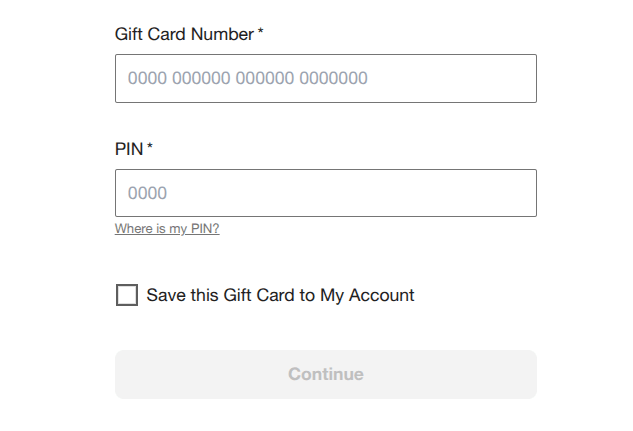
- Navigate to the Home Depot Gift Card Balance Page. You’ll be prompted to access your account.
- Now, submit your card number and PIN printed on the back of your card. Don’t see your PIN? You have to scratch it off to see it.
- Once you’ve confirmed your details, tap Continue to check your remaining balance on your card.
You can follow the same method for an e-Gift card. It’s worth noting that you can’t check your balance as a guest, as you require a Home Depot account to view or reload your funds.
By Phone
Don’t want to create an account? no hassle. You can make a phone call around the clock with a sign-up or the Internet.
Just call 1-877-423-3075 and follow the automated prompts. You’ll need to enter your card number, followed by the PIN.
Then the automated system reads your available balance. Best of all, the process takes under two minutes.
This very method can be quite useful if you have the credentials but lost the physical card, or your internet is spotty. And unlike the online method, it doesn’t require an account.
Through In-Store
If you’re already going to a Home Depot store, this is the easiest option.
Just take your gift card to the customer service desk and ask them to check the balance. They’ll scan it and tell you the amount in seconds.
The best part? You don’t need a receipt or photo ID for a basic balance check — though having the card with you is obviously necessary.
Another option many people overlook is the self-checkout kiosks in Home Depot stores.
You can scan your gift card’s barcode, and the system will display your remaining balance on-screen before you apply it to a transaction. It’s quick and requires no team assistance.
Why Can’t I Check My Home Depot Gift Card Balance?
Can’t check your funds on your card? It could be due to a wrong PIN or a technical glitch. Let’s look at the main reasons why this happens.
Invalid PIN: You likely damaged a digit on the silver coating by scratching it too aggressively. In such a case, call customer support and ask them to verify the balance using the card number alone.
They might ask for the proof of purchase to verify your ownership.
Card not recognized: Double-check your credentials first. If it doesn’t work, then you can call the customer service.
Balance shows zero unexpectedly: This could indicate unauthorized use. So report it to Home Depot customer service immediately. While gift cards function more like cash and don’t have the same fraud protections as credit cards, Home Depot may be able to assist if the card was recently compromised.
Balance not updated after purchase: This can happen as well. In such cases, wait for a few minutes for transactions to go through, then try again.
Frequently Asked Questions
It’s valid for 5 years from the issue date, thanks to the federal CARD Act.
Since you might lose it in a drawer or wallet, or forget the PIN, you should use it meticulously and a little sooner rather than later.
Yes — you can use Home Depot gift cards both in-store and on Home Depot’s official website.
When shopping online, enter your gift card number and PIN at checkout in the gift card payment section.
You can also pay using another payment method if your total exceeds the card balance.
Yes, you can reload your gift card at any Home Depot in-Store or on its official website. Simply ask a cashier to add funds or log in to your account and reload manually.
In the case of a lost or stolen card, you may get a replacement. card. Just call 1-800-466-3337 and explain the issue. However, make sure you have the proof of purchase of the first.
Wrap Up
Checking your Home Depot gift card balance won’t take more than a minute or two. However, the online is the fastest way, but you can also call or check in-store.
Best of all, such gift cards have no fees, no interest, and they don’t expire for at least 5 years. Just keep your card number and PIN safe, so you can check your funds before purchase to avoid surprises.