You’re standing at the Costco checkout, cart full, and you pull out a gift card you haven’t touched in three months. You have zero idea how much is left on it. The line behind you is growing, and this is not the moment to figure it out.
That’s exactly why you should check your Costco gift card balance before you make a purchase — not during. It takes two minutes, and there are several ways to do it. In this article, I’ll walk you through each one so you can pick whatever works for you.
What Is A Costco Shop Card?
Costco doesn’t call them “gift cards.” They call them Costco Shop Cards. However, they work the same way.
You load money between $25-$500, hand it over at checkout, and the balance goes down with each purchase. However, members can load up to $2000.
But here is a catch: Costco shop cards also come with a membership that allows users to reload cards and leverage exclusive offers.
You can buy them in-store, receive them as gifts, or earn them through Costco promotions (like when you buy a certain product and get a shop card in return).
Best of all, they don’t expire, and there are no monthly fees, making them among the more straightforward gift cards out there.
That said, keeping track of the balance is still on you.
How DO I Check My Costco Gift Card Balance?
Check Online
Don’t like talking on the phone? This is the most convenient option for you. You don’t need a Costco membership to look up a shop card balance online. Here’s how to do it:
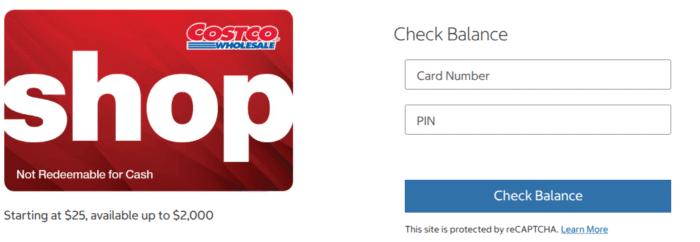
- Head over to the Costco shop card page. You’ll see the boxes to submit your credentials.
- Simply, enter your card number and 4-digit PIN located on the back of your card or inside an email.
- Confirm your details and hit the Check Balance button.
- It’ll show your available funds right on the screen.
To access this page quickly, you can bookmark it. Best of all, you don’t need an account, as you can land on this page and check your funds from wherever you are.
Call the Number
If you’d rather not deal with a website, the phone option works just as well. Flip the card over — there’s a customer service number printed there.
Call it, and an automated system walks you through the balance check. You’ll enter your card number using your keypad, then the PIN. The system reads your balance back to you.
It’s fast. Most people are done in under a minute. This is also a solid backup if you’re somewhere without reliable internet access, or if Costco’s website is giving you trouble.
Didn’t find the number? You can call 1-800-774-2678 and have your balance checked.
Check In-Store
If you’re already on your way to the Costco store, you can check your balance there. Here are two ways to do this:
At the membership counter. Hand your shop card to someone at the front desk and ask for a balance check. They can pull it up quickly.
At a self-checkout kiosk. Some Costco locations let you swipe or scan the card and check the balance without actually completing a purchase.
Not every warehouse has this option set up the same way, so it’s worth asking an employee if you’re not sure how the machines are configured at your location.
Either way, this is a reliable fallback — and if you’re checking right before a purchase, it’s actually the most practical option of the three.
Check Through the Costco App
Costco has a mobile app, and while it’s mostly used for browsing deals and managing your membership, you can also use it to look up your shop card balance if you’re logged into your Costco account.
Open the app, navigate to account settings or the shop card section, and add your card. The balance should display once the card is linked.
This works best if you already have a Costco.com account set up. If you don’t, the website method is probably faster for a one-time check.
Check Your Receipt
This one gets overlooked, but it’s worth mentioning. After any purchase where you use a shop card, the remaining balance is printed at the bottom of your receipt.
If your last Costco trip was recent and you kept the receipt, your balance is right there — no login, no phone call needed. It won’t account for any purchases since then, but for a quick reference, it’s perfectly useful.
Why Should You Check Your Balance?
Because your card might be nearly empty, you’ll need to cover the rest with another payment method. That’s fine — but knowing ahead of time means you can plan for it. You won’t have to dig through your wallet while a cashier waits.
There’s also the fraud angle. If you notice your funds are lower than they should be, catching it early gives you a better shot at resolving it.
And practically, it’s just easier to shop when you know your budget going in.
What If My Balance Is Lower Than Expected?
First, don’t panic. A few things can explain a lower balance before you assume something went wrong.
Think through recent purchases — Costco gas stations, online orders, and in-warehouse buys all draw from the same card. It’s easy to forget a small top-up purchase or a transaction made by a family member who uses the same card.
If you genuinely can’t account for the discrepancy, contact Costco member services. They can pull the transaction history tied to the card. You’ll want the card number ready and, ideally, some idea of when you last used it.
Costco takes these issues seriously. Gift card fraud is a real problem across the retail industry, and retailers have processes in place for investigating suspicious activity. But you do need to act promptly — the sooner you report it, the more options you have.
Can I Use a Costco Shop Card Without a Membership?
This question comes up often, especially when someone gets a shop card as a gift and doesn’t have a membership.
The short answer: it depends. You can use a Costco shop card at Costco.com without a membership — online purchases are open to anyone with a valid card. However, for in-store shopping, Costco generally requires a membership to enter the warehouse.
There are a few exceptions. If you’re accompanied by a member or visiting a Costco pharmacy (which is open to non-members in some states), you might be able to use the card without a membership.
If you’re a non-member who received a shop card as a gift, the online option is probably your cleanest path to using it.
FAQs
Unfortunately no. There is no way around for you to look up your balance with the PIN. You must have it to view your available funds in your card. In case your PIN is scratched off, you can bring your card to a Costco membership counter, and they’ll check the funds after verification.
No, there is no expiration date or inactivity fees on these cards.
You can’t reload your physical or e-Card online or through the app. However, Members have a reloading option at any Costco Warehouse.
No problem. You can split your payment with another shop card, debit, or credit card at checkout. Just hand it over to the cashier, and he/she handle the rest.
Yes, if you have proof of purchase, you can claim a replacement for your lost card from the Costco Membership counter. Or you can get a check refund.
Wrapping Up
That’s there to it. Now you know the process and methods to check your Costco gift card balance. You get a website, app, phone, and in-store option to keep tabs on your funds.
However, the online option is one of the quickest and convienient method out there. All you require is your PIN and your Card number, and you can monitor your funds in seconds.
So if you’re gifting a Costco Shop card to your loved ones, share this guide so they find it useful.