Your Macy’s credit card bill statement has arrived, and now you’re thinking about paying it.
The best part is that Macy’s offers a range of payment options, such as online, app, phone, in-store, and mail.
As we know, its APR is quite high, and late fees add up fast, so it’s crucial to choose the right method to pay on time.
In this article, I’ve conjured up all the working options you can use to pay off your Mayc’s card debt.
What Is the Macy’s Credit Card?
The Macy’s credit card, issued by Citibank, N.A., lets you shop at Macy’s and rack up rewards at the same time. It’s not only about discounts but also about earning points through the Star Rewards program.
And if you have the American Express version, you can shop outside the store anywhere Amex is accepted. However, the store-only card is built to shop only at Macy’s stores.
As for the purchase APR, both cards usually carry a 32.74% variable, so carrying a balance can cost you.
Besides, both versions have the same late fee sitting at $41.
How To Pay Your Macy’s Credit Card Bill
There are a host of ways to pay off your Macy’s bill, with Online and apps being the quickest methods, while in-Store, phone, and mail are old-school ways that work fine.
Pay Online (Macy’s Website)
This is the fastest and most flexible method that you can use to pay bills, set up Autopay, or make monthly payments. Let’s know it step by step.
- Head over to the Macys.com my credit page and tap the Sign In button. You can also create it if you don’t have one yet.
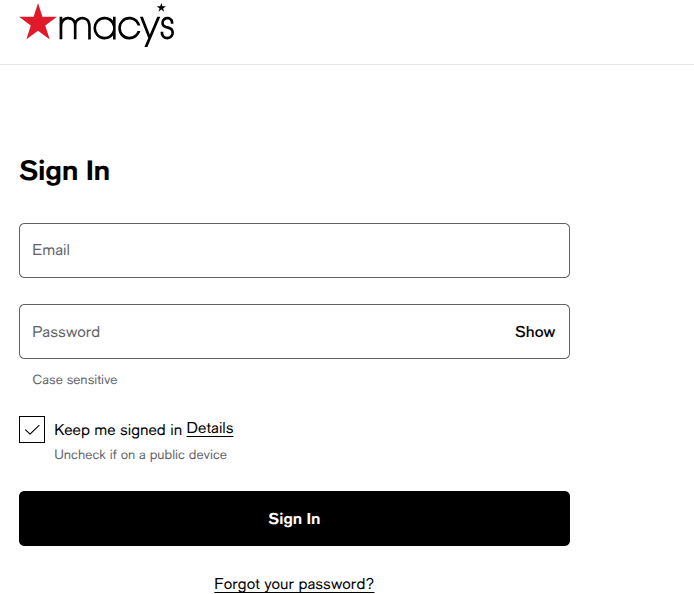
- Next up, enter your email address and password and click the Sign In button to access your account.
- Once logged in, navigate to the Make a Payment or Pay bill section.
- Next, enter your payment amount or select minimum or statement balance, then select your payment method.
- Now schedule your payment, or choose the date to pay off your bill. Make sure you pay it on the due date or earlier on any business day.
- Review everything and hit submit. That’s it. You’ll receive a confirmation notification to your email.
You can set up autopay while you’re in there. You can configure it to pay the minimum, the statement balance, or a fixed amount each month — and that completely removes the risk of a late payment tanking your credit.
Via the Macy’s App
If you’re on your phone more than your laptop, this is arguably the most suitable option.
- Get the app from the iOS or Android. Skip it if you already downloaded it.
- Launch the app and sign in with your Macy’s account.
- Next, add your credit card account if it isn’t already linked. Simply tap “Credit Card” in the menu and follow the prompts to link your Citi account.
- Once you’re inside your account. Tap “Make a Payment” from the credit card section of the app.
- Choose your payment amount and your bank account.
- Confirm and submit. Once the payment is successful, you’ll see a confirmation number.
The Macy’s app is the one-step go-to solution to manage your recent transactions, current balance, autopay, and rewards points.
Pay by Phone
If your internet doesn’t work, phone support will always be there to help you pay your bill.
- Call the Macy’s Credit Card customer service line at 1-888-257-6757. Citibank operates it.
- Listen to the automated menu. For a payment, you can often complete the whole transaction through the automated system without speaking to an agent — it’s quicker that way.
- Have your card number, bank account routing number, and checking account number ready before you call.
- Follow the prompts to enter your payment amount and confirm.
- Note the confirmation number read back to you at the end of the call.
Phone payments go through quickly. However, if you’re paying late in the day and cutting it close, you should ask if it will post before your due date.
Pay by Mail
This method is the slowest of all, so you should plan for at least 7–10 business days earlier. However, if you prefer paper, it still works as a solid option.
- Write a personal check or money order payable to Macy’s Credit Card. Don’t send cash.
- Write your full account number on the memo line of the check.
- Detach the payment coupon from your paper billing statement and include it with your payment.
- Mail to:
Macy’s Card
PO Box 71359
Philadelphia, PA 19176-1359
- You should send it early, as mail takes time. If your check arrives after the due date, you still face a late fee, even if you mailed it in advance. So, you should send it at least two weeks early to stay safe.
If you’ve lost your billing statement, your account number is printed on the front of your Macy’s card.
Pay In-Store
This one tends to surprise people — yes, you can pay your credit card bill while you’re shopping in a physical Macy’s store.
- Visit a Macy’s store during business hours.
- Bring your card (or account number) and your payment — cash, check, or money order.
- Call ahead if you’re planning to use debit, since not all stores accept it.
- Head straight to any open cash register in the store, as standard checkouts now handle credit payments.
- Tell the associate you want to pay and hand over your card and payment.
- Get your receipt and keep it till the payment shows up on your statement.
What’s best? In-store payments post quickly — often the same day. So if you’re running close to your due date and can’t get online, this option works really well.
Smart Tips That Can Save Your Money
It’s good that you know how to pay your bill, but paying every month on time is even better. So here are a few tips that can keep you ahead of the game.
Set up autopay. If you have no problem making a payment every month, then setting up the Autopay is a brilliant idea. Automatic payments make sure you don’t miss a payment and rack up a late fee.
Turn on balance alerts. The Citi portal lets you set email or text alerts when your balance crosses a threshold or when your payment date gets close. These small reminders can really help you stay on track, even though people often overlook them.
Pay more than the minimum. The minimum payment on a store card with 32.74% APR doesn’t affect your principal amount. That said, you must pay more than your interest, so you can pay your bill sooner.
Match payments to payday. If you get paid biweekly, you should try making two smaller payments each month. That way, you’re keeping your balance lower more often.
Since interest depends on your average daily balance, not just the month-end number, this can help you pay less interest overall.
Frequently Asked Questions
You pay either $27 or 1% of your balance plus fees and interest — whichever turns out higher.
Now, interest still adds up, with at least $2 getting charged. So, the amount keeps changing every month. Therefore, you should check your statement regularly to stay on track.
Yes, Yes cardholders can change their due dates once a year. Simply call them or just log in to the Citi portal.
However, you should pick a date a few days after your payday, so you can ease things up a bit.
Missing a payment hits you with a late fee, going up to $41 depending on your balance and history. After 30 days, your issuer may report it, which can pull your credit score down.
If it was a one-time mistake, you should pay it off and call Citi right after. They might waive the fee if you have a good payment history.
Online payments submitted before 5 PM ET on a business day typically post to your account the same day. However, payments made after that cutoff or on weekends post the next business day. Mail payments take 7–10 business days, and In-store payments generally post within one business day.
No. Macy’s (through Citi) doesn’t allow credit-card-to-credit-card payments. Payment methods it includes are checking accounts, savings accounts, checks, money orders, and cash (in-store only).
Using a balance transfer to pay this off? It’s Possible — but fees make it not really worth it unless you’re moving to a 0% intro APR card.
Yes, go to the Citibank Macy’s guest payment site, submit your details, and tap Send Code. Enter the verification code, and just follow the prompts to make a payment.
Wrapping Up
It’s no brainer to make your Macy’s credit card payment. There are some ways that I’ve already outlined in this article.
You can opt for any method that fits your needs. For instance, if you’re having internet issues and need to pay the same day or within a day or two, you should go with phone or in-store payments.
And if you want a more convenient option that doesn’t require any human interaction, then you can go for the online or app methods
Mail is also a good option, but it is a bit time-consuming and may not post your payment on time if arrive late.
However, with a 32.74% APR, you should always pay your full balance every month to avoid hefty interest.
Rewards may help; however, they won’t cover interest, so you must pay in full and on time.