Missing a credit card bill is one of those small mistakes that costs more than it should. A late fee, a potential APR hike, a dent in your credit score — all avoidable with the right setup.
If you’ve got a Chase card and want to stay on top of payments without the stress, you’re in the right place.
Chase offers a few payment options that work just fine. However, it’s up to you which method suits your needs. So let’s jump right into the article.
How to Make Your Chase Credit Card Payment
There are a few ways to pay off your Chase CC bill. You can choose any one that fits your needs. So let’s start with the most convenient method.
Pay Online
Paying online is easy. If you’ve got Chase login details, you can follow the steps below.
- Visit the Chase.com credit cards login epay page.
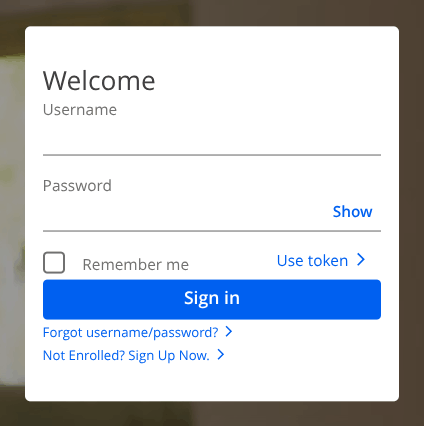
- Enter your login Username and Password. No account? You can tap Sign Up Now to create your account.
- Once logged in, navigate to the “Payment section” or “Pay bill”.
- Next, enter the amount you want to pay or select any option that suits your needs.
- Select your date or schedule your payment. You can also set up automatic payments.
- Link your bank account from where you want to pull your funds.
- That’s it. Wait for the confirmation message, and you’re done.
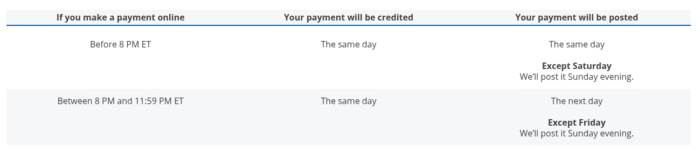
This method will post your payment the same day if you make your payment between 8 PM and 11:59 PM ET. However, for more clarity, you can read Chase’s payment timing here.
Through the App
If you’re more of a go-to person, the app can be the right choice. It’s fast, convenient, and loaded with all the essential options to manage your card. Best of all, it’s available on both Android and iOS.
- Launch the Chase Mobile app and access your account using your Chase account credentials.
- Once you’re inside your account, tap your credit card and select “Pay card”.
- Next up, follow the prompts. All the steps are identical to the online process — choose the amount, the date, and the payment source.
Similar to online, you can set up autopay or schedule your payment so you don’t have to pay your bill manually. Chase App not working? Don’t worry, you can fix it and try again.
Pay by Phone
Paying by phone may not be the most convenient option for many people, but it’s still the most effective method that doesn’t need an internet connection.
- Just call 1-800-436-7958 or find the number on the back of your card.
- You connect with Chase’s automated payment line, where you have to answer a few security questions and enter your credentials when asked.
- You have to follow the prompts to make your payment without any human representative.
However, you can connect with an agent after calling the number on the card for further account-related queries.
By Mail
You can also pay your bill by mail. Though it’s quite a sluggish option, it still works.
So writing a check is quite straightforward, as you have to write your 16-digit credit card number on the memo line of the check and mail it to:
Cardmember Services
P.O. Box 6294
Carol Stream, IL 60197-6294
For Overnight mail:
Chase Card Services
201 N. Walnut Street
De1-0153
Wilmington, DE 19801
Mail can really be time-consuming, so send it at least 7-10 business days before your due date. Sending it near your due date can result in the mail arriving late. That said, it can levy a late fee.
Also, note that it does not accept cash or allow staples or clips. Also, make sure you do not fold it or send one check at a time to avoid confusion and delay.
Via A Chase Branch
- Visit a Chase branch during a business day.
- Just walk up to the cashier and hand over your card and the funding source. That’s it.
- It has over 5000 retail bank branches located across the U.S. You can use the Chase Locator to find your bank.
It’s the best option for people who bank in person or prefer On-site payment confirmation.
Through ATM
Here’s how to pay your Chase bill through an ATM:
- Visit any Select Chase ATM near you.
- Insert your credit card and enter your associated PIN.
- Now select the “More…” option.
- Select “Pay bills” and then select the account you want to pay.
- Now you can pay with Cash or your personal account. Tap Pay it.
- Next, enter a custom amount or choose from the given options.
- Review everything and then tap “Pay it“.
- You’ll get your receipt via email, text message, and print.
- You can take out your card after finalizing payment.
The bank has over 14,000 ATMs across the U.S. and around the world, so you won’t have any trouble finding one. If you have no PIN, ATMs also let you pay using a ZIP code.
How to Set Up Autopay
Autopay ensures your bill gets paid on time. That said, it’s quite a crucial feature a cardholder can get to avoid late fees and interest.
To set it up:
- Launch the Chase Banking app and access your account.
- Navigate to the credit cards and click on the card you want to pay.
- Now tap “Set up”. You can find it next to the Automatic payments text.
- Next, select your Payment amount option from Minimum due, Statement balance, or Fixed amount.
- Once you’ve chosen your amount, add your funding account and click Next.
- Double-check everything, check the box, and tap Set up automatic payment. That’s it.
What Happens If You Miss a Payment
It can levy up to $40 if you don’t pay off your debt on time. You’ve to submit your payment by 5 pm ET on the due date to avoid late fees.
However, cardholders with a strong credit history often get charged $29. Anyway, Chase only reports late payments to the credit bureaus no less than 30 days, so your credit score won’t take a hit.
Still, it’s advisable to pay on time to avoid unnecessary fees that eat up much of your savings.
If you do get hit with a late fee and it was a one-off situation, call Chase customer service at 1-800-432-3117 and ask for a waiver. They might reject your application, but Chase often approves cardholders who have a strong on-time payment history.
Wrap Up
That’s how you can pay your Chase credit card bill. I’ve conjured up all the ways with a step-by-step process.
Each method works — the best one is whichever fits how you actually manage money day-to-day.
Make sure you set up Autopay to protect your credit score and make things smoother.
However, to settle your bill faster, don’t just pay the minimum interest, as it won’t decrease your principal.
So make sure you pay the full amount or more than the minimum to impact your principal amount.
What’s more important is being consistent in paying off your debt every single month.
Frequently Asked Questions (FAQs)
Yes, you can link checking or savings accounts from any U.S bank. It may take up to two business days to verify your new account.
The minimum payment can include a percentage of the outstanding balance plus interest and fees; paying the minimum can therefore reduce some principal. It’ll just avoid late fees but not impact the total balance. On the other hand, paying the full statement balance clears your principal sum, or the debt amount you borrowed.
No, it doesn’t charge any fee for making a payment or adding a bank account. It only levies late fees and interest charges.
Yes. Chase lets you request a different due date for your credit card. You can change it online or by phone.