Paying your Old Navy credit card bill isn’t complicated. But missing a payment? That’s where things get expensive fast. With an APR that sits well above the national average, a single late payment can undo weeks of reward points in one billing cycle.
So whether you just got your card or you’ve been carrying a balance longer than you’d like to admit, here’s exactly what you need to know — including every way to pay, what fees to watch for, and what this card actually is.
So, without any further delay, let’s tap into the article.
What Is the Old Navy Credit Card?
Let’s start from scratch. The Old Navy credit card is actually called the Navyist Rewards Credit Card, issued by Barclays Bank. It comes in two versions, and you don’t get to pick which one — Barclays decides based on your credit profile.
The store-only version works at Old Navy, Gap, Banana Republic, and Athleta. That’s it. If your credit score is around 640 or above, this is usually what you’ll be approved for.
The Navyist Rewards Mastercard works anywhere Mastercard is accepted. You’ll generally need a score of 700 or higher to qualify. Outside the Gap Inc. family of stores, it earns 1 point per dollar spent, making it more useful as an everyday card.
Both versions offer the same core reward rate on Gap Inc. purchases: 5 points per $1 at Old Navy, Gap, Banana Republic, and Athleta.
When you accumulate enough points, you can convert them to reward certificates that you can apply at checkout.
How Do I Make My Old Navy Credit Card Payment
There are four ways to pay: online, by phone, through the mobile app, and by mail. Each has its place depending on how you manage your finances. If you’ve already activated your Old Navy card, you can proceed.
Pay Online (Convenient)
It’s the easiest option that most cardholders use.
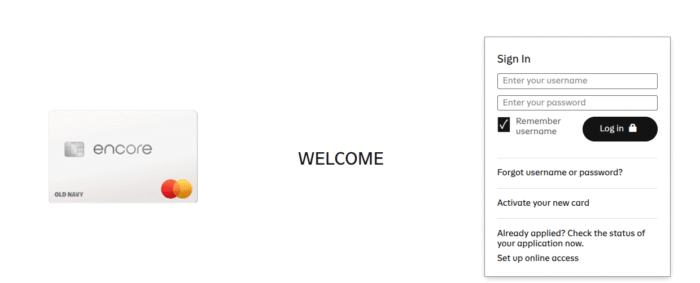
- Head over to oldnavy.barclaysus.com and log in to your account using your username and password.
- Once you’ve signed in, navigate to the “Make a Payment” option in your account dashboard.
- Next up, enter the amount, the date you want the payment processed, and your bank account details — you’ll need your routing number and account number.
- Confirm, and you’re done.
Usually, the payment posts on the same day or the next business day if submitted before the cutoff time. It’s also where you can set up automatic payments, which is worth doing if you’re prone to forgetting due dates.
Don’t have the Barclays account? Don’t worry, you can create one. Or you can pay as a guest. On the Oldnavy.syf.com login page, look for the “Pay As Guest” option. All you need is your account number, last 4-digit SSN, and Zip code.
Pay by Phone
Call 1-866-450-5294. It’s an automated system that works really well. Ensure that you have your credentials ready before making a call. You need:
- Your Old Navy credit card number.
- The amount you want to pay.
- Your bank’s routing number.
- Your checking account number.
Simply go through the prompts, enter your information, and the system will process the payment. It takes about 5 minutes. You can also talk to the customer representative while staying on the line.
It’s worth noting that some phone payment options may incur a processing fee, especially for expedited payments. However, the automated system is typically free, but ask before confirming if you’re skeptical.
Via the Barclays Mobile App
Can’t live without your phone? Then this option is certainly built for you. Just download the Barclays app, which is available on iOS and Android.
Access your account, and navigate to the Wallet or Payments section. Follow the prompts to enter your payment details and submit.
The app also lets you view your statement, check your reward points balance, set up alerts, and more — all from one place.
Pay by Mail
Mailing a check is slower, but it works. If this is your method, write a check or money order — not cash — and make it out to Old Navy or Barclays.
Write your credit card account number on the memo line of the check to make sure it gets applied to the right account. And forward to the regular payment address:
Card Services
P.O. Box 60517
City of Industry, CA 91716
For overnight payment address, mail to:
Card Services
Lock Box 13337
400 White Clay Center Drive
Newark, DE 19711
Ensure you mail in advance of your due date. The postal system doesn’t care about your billing cycle. So give yourself at least 7–10 business days to avoid a penalty.
A payment that arrives late because of a slow envelope still counts as a late payment, and that means a fee and a potential hit to your credit score.
How To Set Up Autopay on Your Old Navy Card
Nothing is more convenient than paying our bills on autopilot. Meaning, you don’t have to open the website every month to make a payment. The autopay feature already works in the background, eliminating any risk of late fees and increasing APR.
To set it up, log in to your account at oldnavy.barclaysus.com. Go to the payments section and look for “AutoPay” or “Automatic Payments.”
You’ll link your bank account and choose any one of these options: minimum payment, statement balance, or a fixed custom amount.
The statement balance option is the one you want. It pays off your full balance each month automatically, keeping your interest charges at zero and keeping the card working in your favor rather than against you.
Tips for Avoiding Fees
A few habits that make a real difference with this card:
- Pay in full every month, without exception. The 23-day grace period means you owe zero interest if the statement balance is cleared before the due date.
- Carrying even a small amount from month to month triggers daily interest accumulation at a very high rate.
- Set a calendar reminder or use autopay. The $41 late fee is easy to avoid — it’s purely a timing issue.
- Don’t use this card for cash advances. The 33.24% cash advance APR starts accruing immediately with no grace period. There’s no situation where that’s a good deal.
- Monitor your points. Reward certificates expire, and unclaimed rewards don’t roll over indefinitely. Log in regularly to see what you’ve earned and redeem before they expire.
Frequently Asked Questions
You can call 1-866-621-0532, and you’ll connect to the automated payment system. Follow the prompts, and make sure you’ve got your card details in place.
You can also reach customer service at 1-866-928-8598 to check your balance or speak with a representative.
No. Old Navy or Gap Inc. stores do not accept in-store payments for your credit card bill. You can only pay via online, phone, the mobile app, or postal mail.
It’ll incur a fee of up to $41. Also, it will give a negative remark on your credit report. However, there’s no penalty APR, but the fee alone is reason enough to pay on time.
Yes. The Old Navy Credit Card gives you a 23-day grace period.
It starts from the end of the billing period until the card’s payment due date.
No. Old Navy and Gap Inc. stores do not accept credit card payments at the register.
Wrapping Up
The Old Navy credit card has a host of payment methods. Online is fastest, phone works great if you have no internet access, the app is the best option on the go, and mail works fine too.
The card itself is a solid tool for regular Gap Inc. shoppers, especially with no annual fee and a 5x rewards rate on in-store purchases.
But it has one drawback: a very high APR that makes carrying a balance quite expensive.
So you should treat it like a debit card in disguise — spend only what you can pay back that month — and the rewards work in your favor.
It’s crucial to set up autopay if you miss timely payments due to busy schedules. Just keep paying on time, or even better, when paying in full, to settle the loan amount faster.