Most people pay their Ally auto loan in under two minutes. You log in, tap a button, and you’re done. But Ally also takes payments through bank bill pay, mail, phone, text, and a couple of walk-in locations.
Some of those cost extra, and a few have rules that can trip you up, especially if you want to pay ahead. Here’s how each one works and which to use.
8 Ways To Pay Your Ally Auto Loan
Ally gives you eight ways to pay. Most people only need the first two, but the rest help when you’re away from a computer or short on time. Fees vary a lot between them, so each method below says what it costs.
Via Ally website or app
This is the fastest option, and Ally charges nothing for it. Go to ally.com/auto or open the Ally app, log in, and find your vehicle in your Snapshot. Select Make a Payment and pay from a checking or savings account. It works any time of day.
Type the address yourself or use the app. Ally recommends this over clicking through search results.
Also Read: Why Is My Ally App Not Working: Fix
Via Auto Pay
Under Payments, you can enroll in Auto Pay. Ally withdraws your monthly payment from your checking or savings account on the day you choose. Pick a date a few days after payday, not the same morning.
Via Your bank’s bill pay
Set Ally up as a payee at your bank. You’ll need your vehicle account number and the payment amount, plus anything else your bank asks for. Some banks mail a paper check, so schedule it early.
By Mail
Send a check to:
Payment Processing Center
P.O. Box 71119
Charlotte, NC 28272-1119
Write your name and account number on it. If one check covers several vehicles, include a list of the account numbers. You don’t need a statement.
By Text
If you’re eligible, you can make one-time monthly payments by text. Ally doesn’t charge for it, though your phone carrier might. Not eligible? The option just won’t appear in your account.
Through Debit card through CheckFreePay
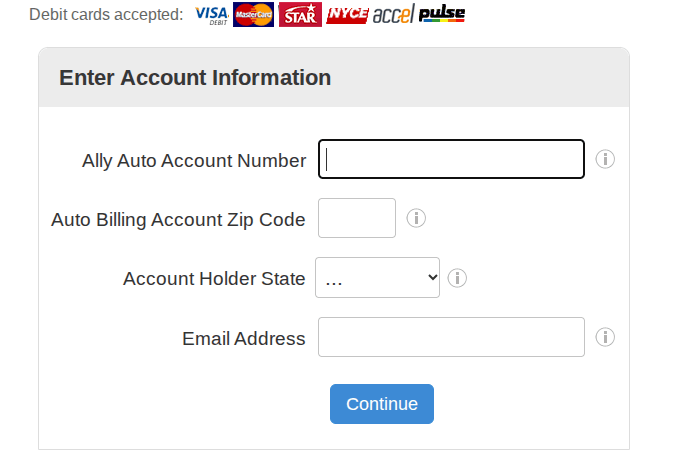
CheckFreePay takes one-time online debit card payments and charges $3.75 on top of your payment. Have your vehicle account number, debit card number, and ZIP code ready.
Phone through ACI Pay
Call 1-888-631-8930. ACI Pay charges a $4 fee on top of your payment. You’ll need your vehicle account number, your bank account or card number, and your ZIP code.
Through MoneyGram or Western Union Quick Collect
Both let you make a one-time payment in person at their locations. Each charges its own fee, which Ally doesn’t list, so ask before you pay.
What it costs to pay
Ally doesn’t charge a fee to pay through its website, app, Auto Pay, bank bill pay, or mail. The fees come from third parties: $3.75 at CheckFreePay, $4 at ACI Pay, and varying amounts at MoneyGram and Western Union.
If a $4 fee gets your payment in before a late fee hits, it’s usually worth it. Late fee terms live in your contract, which you’ll find under Documents, then Contracts and Titles.
How to pay extra on your Ally auto loan
Paying more than you owe can shorten the loan. Online, enter an amount higher than what’s due, and Ally lets you choose: apply the extra to the principal or to future payments. Choose principal if you want to cut interest.
Other methods work differently. Extra money added to a mailed check or bank bill pay goes toward your next scheduled payment, not the principal.
Ally applies every payment to accrued interest first. Whatever’s left goes to the principal.
The Direct Pay catch
If you’re enrolled in Direct Pay, Ally can’t accept extra payments. You’d need to cancel it under Vehicle Details and switch to Auto Pay. You can’t re-enroll in Direct Pay afterward, but Ally doesn’t offer it anymore, so that rarely matters.
After you pay: tracking and payoff
Log in, select your vehicle from Snapshot, and check the payment status. Ally marks it as Completed within 24 hours of receiving it. You can also turn on email or text alerts for confirmations and due-date reminders.
To pay the whole loan off, select your vehicle, then Payments, then View Payoff Quote. Leased vehicles use Lease-End Options instead.
FAQs
No. Fees come only from third-party services like CheckFreePay, ACI Pay, MoneyGram, and Western Union.
Yes. You only need your account number when paying by mail.
Ally presents it again. If your bank still won’t honor it, Ally reverses the payment and contacts you. Once your account has the money, pay again by any method.
You can, but check your contract first. Ally may charge a late fee if the full payment doesn’t arrive by the due date.
Call 1-888-925-2559 to ask about extension options and whether you qualify. Ask before the due date.
Open the Payment Accounts page in your Ally account. One update covers all your vehicles.
Ally’s payment page doesn’t list credit cards. Debit card payments go through CheckFreePay.