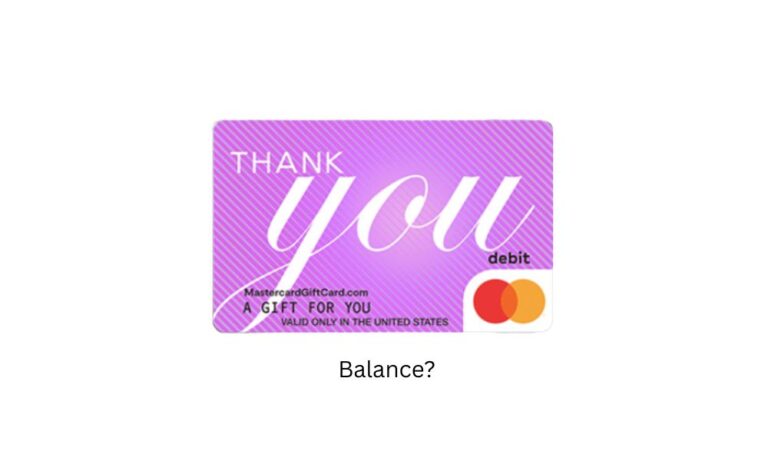
A Mastercard gift card is just plastic until someone switches it on. Most people find that out at the checkout line, when the cashier says “declined” and the card they were so happy to get suddenly feels like a coaster.
Anyway, activation is quick, though. Most cards are ready in a couple of minutes, but the method depends on where you bought it.
So below, I’ll walk you through the three ways to do it. That said, things don’t always go smoothly, so I’ve also covered what to check if something goes wrong. And once your card is live, a few simple habits can save you trouble later.
What you’re actually activating
A Mastercard gift card is prepaid, so it holds a fixed amount and isn’t tied to any bank account. It also can’t be reloaded. So when the money’s gone, that’s it; the card is done.
You’ll run into two versions: a physical card you can tap or swipe, and a virtual one that’s meant mostly for online shopping.
Activation is what tells the issuer the card is in a buyer’s hands and ready to spend. So, if you skip it, the balance just sits there, untouched.
How To Activate a Mastercard Gift Card?
You can confirm your gift card very easily using a website, phone, and In-store. So let’s learn how to activate it –
Via online
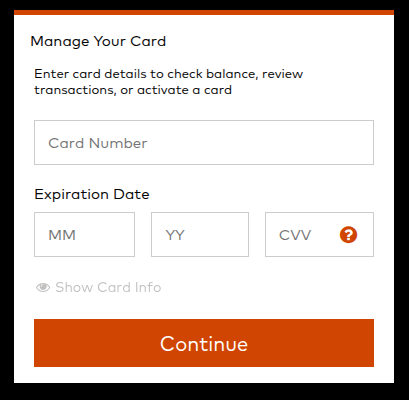
- Start by flipping the card over or checking the packaging for a sticker. It usually names the website you need, so go there and enter the card number, expiry date, and the CVV on the back.
- Not sure you typed it right? Look again, because one wrong digit can throw a wrench in the works. Then hit submit, and you’ll get a confirmation in a flash.
- Head over to the Mastercard official portal, balance.mastercardgiftcard.com. This page lets you log in, activate a card, check your balance, and view your transaction history.
By phone
If typing all those digits on a small screen sounds like a chore, you can turn the card over. You can find a toll-free number on the back.
So calling it not only saves you the hassle but also gives you the option of speaking to a person. All you need to do is follow the prompts, read out the card details when asked, and you’ll get a spoken or text confirmation.
That said, only use the number printed on your card. And it’s not always safe to pick a number from search results, as fake support lines can trick you into asking for your personal details.
Via store
Giants like Walmart, Target, and CVS often activate the card at the register, so yours may be ready to use as soon as you leave.
Still, check the receipt for a note that says it’s activated. If you don’t see one, head back inside and ask the cashier to fix it before you drive off.
When activation doesn’t work
Usually it’s something small. A typo in the card number or expiry date is the most common culprit, so re-enter the details slowly before you panic.
A card that’s been sitting on a shelf for a while may need the issuer to reactivate it. If that happens, call the support number on the back. Keep the card number, receipt, and packaging handy, since they’ll want proof of purchase.
That’s why it pays to hold onto the receipt and packaging until you’ve spent from the card at least once. They’re your backup if anything goes wrong.
After it’s active
When used in shops, the card works like a debit card. A few of them require a PIN, while some cards will allow you to create one. In case the amount of money that you want to spend exceeds the balance, inform the cashier first.
When online shopping, however, it becomes more complicated. A host of online stores require a billing address from you, so you have to register the card on the issuer’s website first.
Also, some stores do not accept gift cards, which is why you should check out their payment page.
Abroad, expect a currency conversion fee, which one guide puts at roughly 1-3%. And a card meant for domestic use may be blocked overseas altogether.
Subscriptions always seem to be the downside. The card is prepaid and cannot be topped up, so payments will likely be declined each month.
However, if the website supports it, you can deposit the funds on the wallet balance and then subscribe to the service from there.
Check the balance before you use
Before heading to any store to make a purchase, check you’ve enough funds to cover a purchase. You can check it online or via phone, as it takes only a minute or two to check your Mastercard balance.
However, if you do it online, you can also view your transaction history, which helps you to track your spending.
Frequently Asked Questions
No, it’s a non-refundable, one-time-use card. So when you refill its balance at purchase, you’re bound to use only those funds. However, there is no expiration date.
You can call customer support and ask them to swap it for a new card with whatever’s left on it. Have your receipt and packaging ready so they can confirm your purchase.
Check your balance first. Then make sure the card is registered online and that the seller accepts prepaid cards at all.
No, activation is a method of verifying that a user is authorized. If someone received your card, they can’t use it until they activate it.
No, they do not expire. Even if you keep it in a drawer for years, you can call the issuer to confirm it.
Sometimes. You’d add it as a payment method; it needs a registered billing address, and PayPal may place a small verification hold. Whether it works can depend on the card issuer.
Often, yes. The FlashChange guide puts the purchase fee at roughly $3 to $6, depending on the card’s value. The exact amount varies by seller, so it’s on the packaging.