Most people find out at the worst possible moment — standing at the counter, groceries on the belt, and the cashier tells you the card came up short.
It’s quite an embarrassing situation, and checking your Publix gift card balance beforehand takes less than a minute once you know where to look.
In this article, I’ll walk you through exactly what the Publix gift card is, where to get one, how to spend it, and every method available to check your available funds before you spend.
What Is the Publix Gift Card?
The Publix gift card is a prepaid store card issued directly by Publix Super Markets, designed for use across all Publix locations — including in-store groceries, the deli, bakery, pharmacy counters, and liquor stores.
Cardholders can reload between $5 to $500, making them practical for everything from a small thank-you gesture to a corporate gifting program.
It’s available in two versions: the physical card and the eGift card. You get physical cards through the mail, via doorstep delivery, or you can purchase them at the counter.
On the other hand, you can get the e-Gift card directly to your email address. It’s quite a reliable and fast option when gifting someone at the last moment.
Such cards do not expire, meaning you can use them for as long as you want or until the balance is exhausted. On top of that, it has no activation fees or maintenance fees, so you don’t have to worry about anything before buying it.
The only thing that’s worth noting is that you can reload physical cards at any Publix register, unlike eGift cards, which you can reload only at the time of purchase.
So if you have a grocery budget defined for weekly or monthly, you can consider getting this gift card or give it to someone who loves shopping for groceries online.
How to Check Your Publix Gift Card Balance
It’s a no-brainer to look up your remaining funds on the card. If you’ve received your card either through the mail or email, you can follow the steps below.
Check Your Balance Online
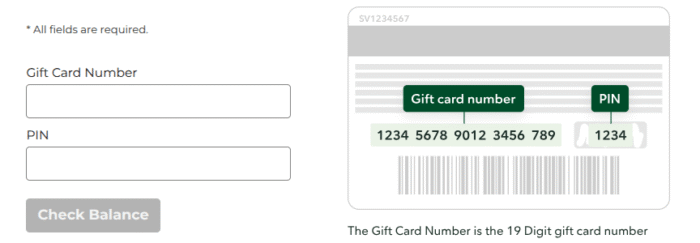
- Navigate to the Publix gift card balance page.
- Next, you have to enter your 19-digit Gift card number and PIN in the given fields. You can find your credentials on the back of your gift card. You have to scratch off your PIN area to see your PIN.
- Double-check the details and tap “Check Balance”.
- Now you can see your remaining funds without accessing your account.
Make sure you’re landing on the valid Publix website from the United States, as using the VPN of a different country might not work.
Check Through the Publix App
If you have the Publix mobile app installed and a Club Publix account, this is arguably the most convenient method out there.
- Launch your app, and access your account.
- Tap Menu, Navigate to “Payment Methods,” and any linked gift cards will show their current balance.
- When you add your gift card to your Club Publix account, you can check your funds by tapping the top-left menu and selecting “Payment Methods.”
- You’ll see the updated balance after every transaction, so there is no need to check it manually.
Check by Phone
For cardholders who prefer not to use a website or app, the phone option works just as well.
Simply call 1-800-830-8159 on business days, 8 a.m. to 5 p.m, and follow the automated prompts to enter your card number and view your funds.
This method is particularly useful if you’ve received a card and don’t have access to any device or the internet, or if you want to confirm a balance while you’re already on the phone with customer service for another reason.
Check In Store
You can check your funds at any Publix store location by handing it to a cashier or customer service desk. The cashier will scan the card and read out the remaining balance on the spot.
This method can be quite useful if your card isn’t reading correctly or is not working; store staff can look into your issue immediately.
For instance, a damaged magnetic strip or PIN entry lockout due to too many incorrect attempts. So it’s easier to resolve in person than through any online channel.
Where to Buy a Publix Gift Card
Physical Publix gift cards can be mailed directly from Publix’s website, while eGift cards can be emailed through the same platform.
For in-person purchases, you can find them at any Publix customer service counter. And if you want for businesses and corporations, you can order in bulk through a dedicated phone line at 1-800-830-8159.
For gift buyers, eGift cards are a smart choice — they arrive in the recipient’s inbox within minutes, let you add a personal message, and eliminate shipping delays.
Physical cards, on the other hand, work better for in-person gifting occasions because they feel more personal.
One thing to know upfront: you cannot use a Publix gift card to buy another gift card, and you also cannot get cash back from it. The money on the card can only be used within the Publix ecosystem.
How to Use a Publix Gift Card
Using the card in-store is as easy as you may think. Just bring it when heading to any register, show it to the cashier, or swipe it yourself when making a payment.
You can also cover your payment with cash, debit card, or credit card if your purchase total exceeds the card balance.
If you have a debit or credit card saved in your Club Publix account, not only will the gift card balance be applied first, but also any remaining amount will automatically be charged to your saved card unless you request a different payment method.
For online orders and in-store pickup, the process is just as easy. Just add your gift card to your Club Publix account, and you’re all set to use it at Publix Super Markets, Publix Liquors, and Publix Pharmacies.
Setting up Club Publix is worth it if you use the card often.
Once you add the gift card, you can access the balance both on the physical card and in your account at the same time.
What’s more? It allows you to save up to eight payment methods in your account at once, including gift cards.
Frequently Asked Questions
No, Publix gift cards don’t expire. There are also no inactivity fees under standard federal rules. That said, you can keep and use them whenever you want.
Don’t you need security? Well, a PIN is crucial for authorizing your transaction online or by phone. It’s a way to secure your payment so others can’t use your card. And yes, you need a PIN to check your balance online or by phone.
Anyway, if it’s unreadable, you can navigate to any store in-person and ask the staff to manually access the account.
Yes, you can reload up to $500 on your physical card at any Publix register. However, eGift cards are non-reloadable.
If your order amount is more than your gift card balance, your saved payment methods can cover your bill. Also, you can pay via cash or other debit or credit card if no backup payment method is available.
You can save up to 8 methods in your Club Publix account, which includes debit/credit cards and gift cards. Best of all, cards with a Zero balance don’t show up at the checkout.
Wrapping Up
Checking a Publix gift card balance is one of the simplest tasks that takes a few seconds, depending on the method you choose.
Simply head to the mentioned website, submit your credentials, and your funds will show up on the screen.
For more flexibility, you can create an account or access the Publix app and add your gift card for shopping.
However, in-store works best when the card has an issue that needs a real person to resolve.
When it comes to fees, the card has zero fees, not even at the time of a purchase. All you need to do is reload it (up to $500) and use it like any debit card for shopping at Publix.