Few people would say no to saving money while shopping. And if you’re an avid buyer at Nordstrom, you must be using its card to rack up exclusive discounts, rewards, and financing offers along the way.
However, if you’re a new cardholder and aren’t quite sure how to make your Nordstrom credit card payment, this article is for you.
What Is a Nordstrom Credit Card?
A Nordstrom credit card is a store card issued through TD Bank that lets you rack up Nordstrom Rewards points every time you shop at Nordstrom, Nordstrom Rack, or Nordstrom.com.
There are two versions to pick from. The Store Card stays in the Nordstrom family, while the Visa Signature Card gets around, working anywhere Visa is accepted, from the gas pump to your grocery run.
The points add up fast, too. Every Nordy Club member earns 1 point per $1, but cardholders start at Influencer status right out of the gate, doubling that to 2 points per $1. Climb to Ambassador or Icon status and you’re pulling in 3 points a dollar.
Visa cardholders sweeten the deal further, earning 2 points per $1 on gas, groceries, dining, and streaming, well beyond Nordstrom’s doors. No annual fee, either, which already puts it a notch above plenty of store cards.
Signing up also fast-tracks you into Influencer status, a spot that normally takes $500 a year in spending to earn. That unlocks free two-day shipping in select areas, early dibs on Select Brands and Clear the Rack, and a few Double Points Days a year.
There’s also a little something for the tailoring crowd: basic alterations on card purchases get reimbursed up to a set amount, plus an extra 5% off at the Rack, stacked on top of the markdowns already in play.
Store Card or Visa, paying your bill works the same either way. Here’s every route to get it paid, what to do when a payment goes sideways, and the questions cardholders ask most.
How To Pay Your Nordstrom Credit Card Bill
You can pay your bill in several ways. The easiest and most convenient option for most cardholders is to make a payment online or through the mobile app.
That said, this isn’t the only method available. We’ll walk through all the payment options in the sections below so you can choose the one that works best for you.
Through Online (Login Required)
As we mentioned earlier, this is one of the straightforward methods to pay your bill.
Anyway, you’ll need an internet connection and the right website to access before entering your credentials.
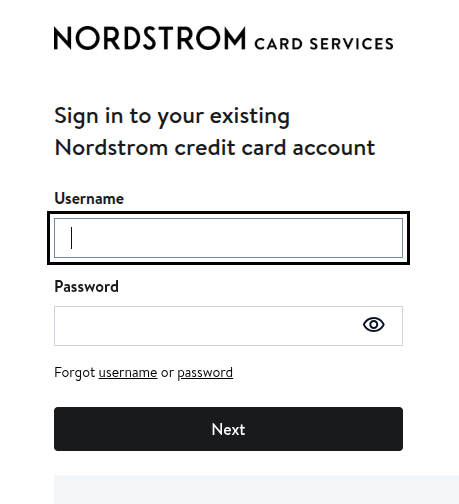
- Head over to the Nordstromcard.com/en/pay-bill/make-a-transfer/. You’ll be redirected to the login page.
- Now, enter your username and password and click Next. No account? You can enroll for a Nordstrom Credit Card and create your login details.
- Once logged in, navigate to “Pay my card or “Pay Now” from the dashboard.
- Choose the payment option or enter a custom amount. Pick a date and select the payment method.
- Double-check everything and submit. You’ll receive a confirmation message if all correct.
Don’t want to pay every month on your own? Well, you can schedule a payment or set up Autopay to streamline your bills.
Via The TD Bank (US) App
Don’t want to get into the signing process again and again? Then the app is the best option for you.
Using the TD Bank app, you don’t have to log in multiple times, as a one-time setup is all you need to manage your account on the go.
However, the process is all the same: you access your account, find your credit card, navigate to the “Pay & Manage My Card” section, and go through the same process similar to online.
Pay by Phone
What’s best? Nordstrom offers automated phone payments, allowing users to pay their bill anytime during the day.
All you need to do is call 1.800.264.6260 and answer a few questions to reimburse your debit amount. You can also use the same number for general credit card inquiries and account management.
The system will ask you for your card number, routing number, and bank account, so keep these credentials ready with you.
Don’t want to talk to a robot? You can also speak with a live representative about your account instead of making a payment.
Pay by Mail
It’s the oldest and slowest of all the methods, but it still works. You may choose it, but it takes the longest to post.
So when sending a mail, you need to ensure you’re sending it at least 7 days before your due date so it arrives on time and doesn’t impose any late fee.
It doesn’t accept cash, so just write your account number on the memo line on the check and mail it to:
Nordstrom Card Services
PO Box 100257
Columbia, SC 29202-3257
Pay In Person at a Store
If you’re visiting any store, then you can also pay your Nordstrom credit card bill at the customer service desk.
It works for both your Store card and the Visa Signature Card. Unlike Mail, it’s fast and quite effective when the due date is near.
So, you just need to hand over your card to a cashier, with the amount in cash or other payment options. They’ll show you the receipt after the confirmation.
Jot down the fact that some stores don’t accept such payments, so confirm with the store earlier.
Why couldn’t my payment be posted?
Nothing is more frustrating than a payment failure, especially when the due date is near or on the same day.
Anyway, you can fix this issue after sorting out a few reasons.
Payment Declined
Does your linked bank account have enough funds? If it has insufficient funds, it can show a declined message.
It may also be caused by your incorrect routing number or a closed account on file.
So, it’s important to check that your bank account has enough funds or the correct credentials.
After confirming all the details, you can try to pay your bill again.
Balance Not Updated
You may have made a payment, but it has not been reflected in your account balance. This could happen due to a technical glitch, or the system has a fixed time to update a balance.
Usually, Online and phone payments get posted within one business day, unless a holiday falls on the queue.
However, paying a bill via mail can take up to a week or even more, depending on when the mail gets delivered.
If it’s more than what it actually should take, you can reach out to customer support by calling 1-866-445-0433.
Can’t Access The Account
Ensure you’re entering the correct username and password when accessing your account through the Website or app.
If you enter the wrong credentials multiple times, you can end up locking out your account for a few hours.
In case you forgot your username or password, you can reset it using your personal information, such as the last four digits of your SSN and card details.
Autopay Didn’t Work
Even after setting up autopay, you have to make sure your linked bank account has adequate funds.
No wonder it won’t pull the funds if it’s not enough. Also, check that you haven’t disabled auto-pay settings by mistake while re-issuing or updating your card.
Note that if your card was replaced, you may need to re-set up your autopay settings.
Frequently Asked Questions
It depends on your revolving balance and your approval terms. However, it has a 31.90% APR or Annual Percentage Rate and a $0.50 minimum interest charge.
Yes. When you pay your full statement balance by the due date, you will not incur any interest charges on the purchases made in that month. Otherwise, you will start accruing interest charges on the outstanding balance.
No. You cannot use a debit or credit card to make a Nordstrom payment. Until now, it supports a checking or savings account.
You have to pay a late fee when you miss paying a bill on time. However, if you have good standing, you can request a fee waiver once by calling 866-445-0433.
Yes, both card versions are valid for use at Nordstrom Rack locations and on NordstromRack.com. You can also use them at regular stores or its website.
Wrapping Up
Now you’ve read all the methods to pay your Nordstrom card bill. All methods work, but choose the one that best fits your needs.
For instance, if you don’t want to access your account, you can use a phone or visit in-store.
However, online is the most straightforward and convenient way to pay off your debt.
What’s more important is that you pay on time and try to pay your statement balance in full, instead of settling interest only.
What’s more important is that you pay on time and try to pay your statement balance in full, rather than settling only the interest.
You can enable autopay or schedule a payment to avoid late fees and build your credit score.