Home Depot is the one-stop solution for purchasing items to refurbish your home. If you’re a savvy consumer who uses its credit cards to shop at the Home Depot, then you shouldn’t ignore the payment options it has to offer.
So, whether you’re trying to pay off your debt or are interested in learning a few ways to stay ahead of the game, you can read this article.
It covers every essential thing about the card that cannot only help you choose your payment method wisely, but also answer some of the most common questions. So without any further ado. Let’s get started.
How To Make Your Home Depot Credit Card Payment
There are five ways to settle your bill: Online, app, phone, mail, and in-Store. So let’s start with the most flexible option.
Pay via Citibankonline (Online)
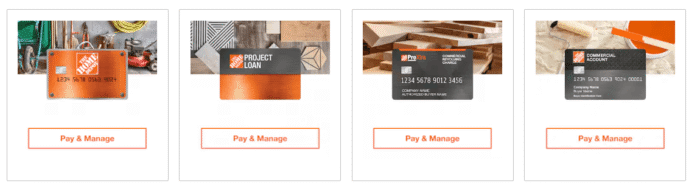
- Head over to the Home Depot credit cards page and scroll down to select your card version: Consumer, Project Loan, Pro XTRA, and Commercial.
- Or Consumer cardholders can directly navigate to the Home Depot credit card account page. It’s the service page by Citibank to manage your Home Depot credit card account.
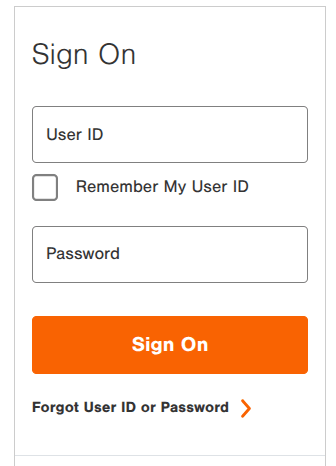
- Now submit your User ID and Password and click Sign On. Don’t have an account? You can tap Get Started on the same page and create your account online.
- So, once you log in, select the “Make A Payment” section from your account dashboard.
- Next up, enter your payment amount or choose the minimum due or full balance.
- Add your bank account if not linked, and select the payment date.
- Double-check everything and submit your payment. You’ll get your confirmation number right in your email inbox or dashboard.
Pay by Phone
Home Depot also offers a phone service that allows cardholders to pay their bills without internet access.
So, all they have to do is call 1-800-677-0232. It’s the official Citibank number for Home Depot cardholders that handles both automated payments and live customer service.
Next, follow the automated payment prompts. You have to provide your 16-digit card number and the bank details you want to pay from.
And after that, specify your payment amount and confirm the bank account. The system will read back everything that you’ve entered before initiating a payment.
Phone payments typically process on the same day, making it a useful method for last-minute payments.
Pay Through the Citi Mobile App
If you already have the Citi Mobile App on your phone, this is the most convenient ongoing method.
- Don’t have the app? Simply head over to the Play Store or App Store and download and install the Citi Mobile App.
- Launch it and log in with your Citi credentials — the same ones you use at homedepot.com/mycard.
- Next up, select your Home Depot credit card.
- Tap Credit Services or the Manage Card section.
- Select “Make a Payment,” and choose your payment details.
- Confirm and submit. That’s it.
The app also allows you to set up Autopay, track account activity, and more.
Pay by Mail
Prefer paper transactions? Post mail is the reliable option. It doesn’t need Internet access. However, it’s the slower process that can take days to post your payment.
So to post your mail, write a check or money order. Make sure you write your account number in the memo line.
And send to the address:-
Reguler
The Home Depot® Consumer Credit Card Payments
Home Depot Credit Services
PO Box 70600
Philadelphia, PA 19176-0600
Overnight
The Home Depot® Consumer Credit Card Overnight Delivery/Express Payments
Attn: Consumer Payment Dept.
400 White Clay Center Drive
Newark, DE 19711
If you get a paper statement, just use the return envelope and payment coupon that come with it.
Ensure you send it a week early from the due date to post it correctly. The issue can levy a late fee if your mail arrives late. And don’t forget to track it.
Via Home Depot Store
Nothing surprising at all. You can walk into your nearest Home Depot and pay your credit card bill at the customer service desk.
Just tell the associate you want to pay with your The Home Depot credit card.
Give your payment details — bank account, debit card, or cash — along with your card number. They process it right there.
Once your payment is confirmed, simply wait 1-2 business days to post it to your account.
How To Register?
You can pay as a guest, but if you want to manage your account, you need an online profile. You got a card? Then here’s how to create your Home Depot credit account.
- Simply visit the same login page and scroll down until you see the “Don’t have a User ID yet?”.
- Just tap “GET STARTED“.
- On the next screen, enter your credit card number and hit CONTINUE.
- Next, submit your SSN (only last four digits), along with your CVV, and your date of birth. It will verify your identity.
- Once verified, create your unique User ID and Password, and go through a few security questions.
- That’s it. Tap Confirm to finish your registration.
Finish registration? Now you can sign in to your account anytime and manage your card like a pro.
What Is the Home Depot Credit Card?
It’s built for Home Depot customers for extra discounts and rewards, issued by Citibank, N.A.
Unlike a Home Depot Gift Card, it has a credit line and a fee structure. Many cardholders use it for home improvement projects, appliances, tools, building materials, and large purchases with promotional financing offers.
Citibank issues the Home Depot consumer credit card. Whereas, Commercial and business versions are issued through Citibank and other financial partners linked with Home Depot’s commercial credit services.
Akin to other cards, it has no annual fee. However, it usually comes with a high interest rate of nearly 29.99%, while some users may get a 17.99%, depending on their credit history.
If you don’t pay in full by the due date, an interest rate will be added. So you should consider settling a bill quickly to avoid extra charges.
Setting Up AutoPay
You don’t want to pay your bill manually month after month, right? Autopay can help. It not only makes sure you never miss your due date, but it also gives you a sense of relief. Here’s how to set it up.
- Access your Home Depot credit card account using the same method you use to pay bills.
- Once you’re in, navigate to the “Payments” or “Manage Payments” section.
- Tap “Set Up AutoPay” or “Automatic Payments.” Both are the same thing.
- Choose your payment structure and select your bank account.
- Next up, pick your pay date. Double-check everything and hit Confirm.
Once you turn on Autopay, your payments go through automatically every month. The best part? You stay on time and avoid late fees.
Frequently Asked Questions
Yes, you can pay off your card debt at any Home Depot checkout counter. This works well if you’re already in the store and want to get it done quickly.
However, even if you pay the same day, you might still wait one to two business days before the payment shows up on your account. Also, ensure your bank is open on the following day.
The issuer will levy a fee of up to $40 when you miss your due date. However, the problem can be huge if you’re using a deferred interest promotional period, as missing even a single payment can complicate your timeline for paying off the full balance before the period ends.
Consistent missing payments may also cut you from the promotional offer completely.
Generally, it takes 1-5 business days to post. But if you have Citibank’s checking and credit accounts, posting can happen faster. However, mail payments can take five to seven business days.
Yes, the Home Depot Consumer Credit Card lets you pick a due date that works for you — at the beginning, middle, or end of the month.
If you want to change it, just log in to your account and look for the “Change Payment Due Date” option. You can also call 1-800-677-0232 and get it sorted quickly.
No, you don’t pay any extra fees to make a payment. Online, by phone, by mail, in-store, or through the app are completely free.
Wrap Up
Hopefully, you’ve chosen the right method to pay off your Home Depot CC debt.
Summing up, paying online works best when it comes to speed and convenience. Phone payments work great when you need quick support or want to confirm things instantly.
Mail is also the right option if you prefer handling bills the traditional way. And the In-store payments make sense when you’re already visiting the store and want to get it done on the spot.
Anyway, online or an app is the best way to make your payment because it allows cardholders to set up autopay.
It keeps you on time, avoids late fees, and helps you stay clear of costly interest without having to remember every due date.