A toll invoice in the mailbox is never a fun surprise, but paying it takes a couple of minutes. The North Carolina Turnpike Authority runs NC Quick Pass, and ncquickpass.com is the official place to pay, whether you log in to an account or just enter an invoice number.
This guide covers every way to pay, what to do if you’re locked out, how to open an account, and how to spot the fake payment sites that follow every toll bill.
How to Access NC Quick Pass to Pay Your Bill
If you have an account, it takes a few clicks to pay your NC Quick Pass bill. However, you can still settle an invoice without an account.
So, Here’s how to log in if you do have one:
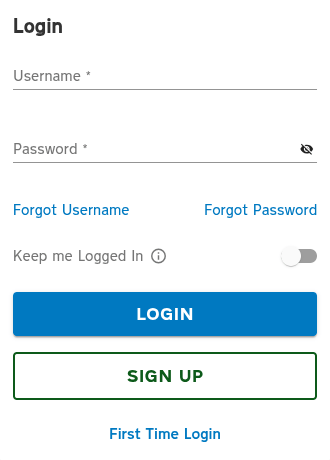
- Navigate to ncquickpass.com and click Login at the top of the page.
Next up, enter your username and password, then tap Login. (You can also tick Remember Me if you want the site to save your username for next time.) - Once you’re logged in, navigate to Payment Options, choose One-Time Payment, enter the amount due, and select Pay Now.
Already a customer but never set up a username and password? Use the option on the login page to create your login credentials. You don’t need a new account.
Forgot your password? Click Forgot Password, enter your username, and select Next. You’ll receive a temporary password and a link to reset it.
To find your username? Click Forgot Username, then enter your email address and select Send My Username.
Every way to pay an NC Quick Pass bill
Online, with your invoice. Go to ncquickpass.com and click Pay Now. Search using either the invoice number printed on your bill or your license plate number, then select Pay Invoice.
The total shows up on the next screen. Click Next, fill in your payment details, card details, and billing address, click Next again, and look over the Confirm & Pay page.
If it’s right, hit Pay Now. Frequent Bill by Mail customers don’t even have to wait for the paper invoice to show up. They can pay online whenever they like.
The NC Quick Pass app. It’s on the Apple App Store and Google Play. You can manage an account or pay an invoice from it, which is handy when the bill lands on your kitchen counter and your laptop is nowhere near.
By phone. Call 877-769-7277 and pay with a customer service rep.
In person. There are customer service centers in Charlotte and Monroe. Hours are Monday to Friday, 9 a.m. to 5 p.m., and Saturday, 9 a.m. to 2 p.m.
MoneyGram. You can pay an invoice or add funds to your account at a MoneyGram location, which helps if you’d rather not use a card.
License plate agencies. Some participating License Plate Agency offices have an NC Quick Pass station inside.
By mail. Send a check or money order to NC Quick Pass, P.O. Box 100020, Atlanta, GA 30348-0020. Please don’t send cash.
Why Can’t I Access My NC Quick Pass A Account?
Most login issues come down to a forgotten password or username, or never having set up credentials in the first place. However, all of these are fixable from the login page.
If you forgot your password, you can reset it by clicking the Forgot Password link. Similarly, you can find your username by clicking the Send My Username option. You simply have to follow the prompts to recover your login credentials.
There’s another reason that catches people off guard: a suspended account. If your balance runs out of funds, NC Quick Pass suspends the account, deactivates your transponder, and notifies you by mail or email. Logging in won’t fix that on its own.
To get going again, you have to pay all toll charges, processing fees, and any civil penalties, then refill the balance. After you log in, that’s the same One-Time Payment route from earlier.
Still locked out after all that? Call 877-769-7277 or stop by a service center. Whatever you do, don’t go hunting for a “reset” link through a search ad. More on that below.
No Account? Here’s How to Create One
You can live without an account. Paying by invoice works fine, but it costs more. Invoices go out at the higher Bill by Mail rate, while account holders get 50% off tolls in North Carolina, according to the current site.
Older NC Quick Pass handouts still circulating online say 35%, so check ncquickpass.com for the number in effect when you read this.
An account also means no paper invoices, automatic payments, and a transponder that reads your toll without relying on your plate.
One rule trips people up: you can’t open an account while old invoices are still unpaid. If you’ve got an outstanding bill, take care of it first through Pay Now, then head to the Open an Account page.
From there, you’ll pick from three transponder types, and once the account is set up, NC Quick Pass sends everything you need to hit the road.
Picked up a transponder on the go instead? It still has to be activated properly before it works, and the site has a separate page that walks you through it, so don’t skip that part.
What Happens If You Pay Late
The first invoice is just the tolls, no fees. After that, it gets pricey.
Miss the due date and the second invoice adds a $6.00 processing fee on top of your balance and any new tolls. The third invoice carries another $6.00 fee plus a $25.00 civil penalty.
The fourth has the $6.00 fee again. If that one goes unpaid, expect a DMV vehicle registration hold and the balance heading to collections. The hold stays until the balance is paid in full.
So if there’s one thing to take from this guide, it’s to pay the first invoice. It’s the only one with no fees attached.
Spotting Fake Payment Sites and Texts
Scammers love toll bills because everyone who gets one is a little rattled. NC Quick Pass publishes a few simple checks, and they’re worth memorizing.
It will never ask you to pay by text. Real texts come from the short code 696277, and every link points to ncquickpass.com or secure.ncquickpass.com. Emails come only from no-reply-ncquickpass@ncdot.gov, and they never ask for personal or financial information. If a message fails any of those tests, don’t tap anything.
Lookalike websites are just as risky. A WRAL report warned that third-party sites can cost you more, and you can even get hit with late fees despite paying on time.
So before you type in a card number, double-check the address bar. Anything other than ncquickpass.com or secure.ncquickpass.com is worth walking away from, however official the page looks.
If a suspicious text or email lands in your inbox, don’t tap anything. You can report it to the FTC or the FBI’s Internet Crime Complaint Center, and contacting NC Quick Pass directly is the quickest way to find out whether a message is real.
Got an Invoice You Don’t Recognize?
Don’t pay it blind, and don’t ignore it either. If the license plate on the invoice isn’t yours, you can dispute the toll through the Dispute a Toll page, which beats paying for a charge that was never yours to begin with.
It’s also worth knowing why account holders get invoices at all. A transponder that’s installed badly may not be detected, and if more than 15% of your transactions get picked up by plate instead, postpaid charges start showing up.
A deactivated transponder from a negative balance does the same thing. That said, the I-77 Express Lanes are a different story. There, an invoice can simply mean the trip didn’t meet the HOV requirements.
When you contact NC Quick Pass online, you get a case ID, and the site not only lets you check your case details but also shows the team’s replies in the Comment section. With an account, you’ll find the ID under History in the Contact section.
Without one, go to Pay Now, search by invoice number plus your plate or ZIP code, and select Contact Us. You can sort all of this out from home, making it a pretty painless way to get answers without a trip to a service center.
Wrap Up
Paying an NC Quick Pass bill is easy once you’re on the right site. If you have an account, log in at ncquickpass.com. If you don’t, use Pay Now with an invoice number or license plate, and you can sort it out from home in a couple of minutes. The phone, app, mail, MoneyGram, and in-person options cover everything else.
Locked out? The password and username fixes only take a few minutes, so don’t let a forgotten login stop you from paying on time. That said, the first invoice is the only one without fees, which makes acting fast the smartest move.
If you’re tired of invoices piling up, opening an account is worth considering. It cuts your toll costs, ends the paper mail, and not only saves you money but also gets rid of the guesswork.
Just pay any outstanding invoices first, since NC Quick Pass won’t open an account until old ones are cleared.