So your new sleek American Express card is on the way or has just arrived in the mail, and you just want to use it and rack up some rewards, right?
But first, you need to activate your card, and if you haven’t already done that, this is where you should be.
So by activating, you confirm that you’re the real owner of the card, so it doesn’t get into the hands of any unknown.
Confirmation not only secures your account but also allows you to initiate any transaction.
The best part? You have multiple ways to activate it, so you can choose what fits your needs.
So without taking any more time, let’s barge forward.
What You Need Before Starting
Make sure you’ve your Amex Credit Card credentials in place while you’re trying to confirm. You need these details to get started.
- Your 15-digit Credit Card number and 4-digit Card ID are printed on the front of the card.
- Personal details such as your name, date of birth, e.t.c.
- Your physical credit card is required for direct verification via the app.
You can apply for a replacement card using the same process. Once your new card is activated, the old card automatically halts.
How To Activate Your Amex Credit Card
There are a host of ways you can try to confirm your card. So let’s explore every possible method step-by-step.
Activate Online
If you want speed and flexibility, this method is all you need for a seamless activation.
Before you confirm, ensure you’ve a solid internet connection and a lightweight browser so your process becomes easy.
You may need to create an account during the process. So let’s follow the steps below.
- Head to the American Express Card Activation Page.

- Now you’ll see the “Before you continue” section. Just read it and tap “Continue”.
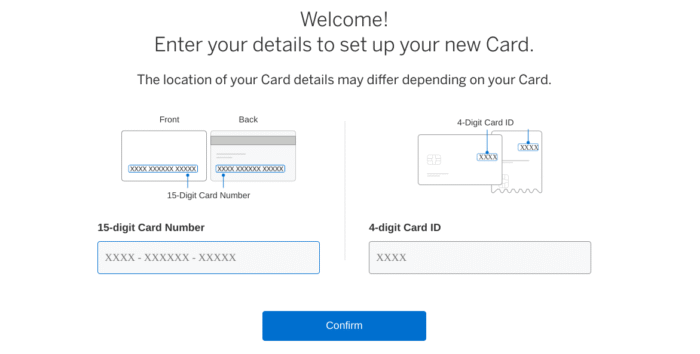
- Type your 15-digit card number and 4-digit Card ID (Located on the front or back) and hit Confirm. Ensure that there are no typos.
- To verify your identity, provide your personal details, like your Security Number (last 4 digits) and date of birth. Once submitted, click Continue.
- Now you’ll be asked to set a 4-digit ATM PIN to withdraw funds from the ATM network.
- Next up, create your account if you haven’t already. Create your unique username and password to manage your account.
- Once you’ve got a confirmation message, your card will be ready to use. You can add it to the App Store or Play Store and pay securely.
Activate Through the App
If you’re the person who lives on your phone most of the time, then you can set up your card using the American Express app.
Simply, download the official Amex app from the App Store or Google Play and follow the steps below.
- Launch the American Express app installed on your phone.
- Now sign up for a new account; ignore if you already have one. And log in to your account. Make sure you choose Account Type as “Cards and Banking”.
- When on the dashboard, tap the “add a card” option. You can find this under your accounts tab or the Menu icon.
- After linking a card, tap to activate the card.
- Next, provide your card credentials and personal details as you would in the online process.
- Or you can hold your card near the phone for NFC to read the details automatically.
Simply set or confirm your PIN if prompted. You’ll get a Confirmation message instantly.
By following such a method, not only do you activate the card, but you also get access to your account balance, transaction history, offers, and rewards – all in one place.
Activate by Phone
If you prefer talking to a human rather than relying on the Internet? Phone is the only option.
Look at the sticker on your card, as it lists a specific activation number. Usually, 1-800-528-4800 for personal cards.
Simply call the number, and the automated system will guide you to confirm your card. When on call –
- Enter your 15-digit card number
- Enter your 4-digit Card ID.
- Next up, confirm your date of birth or other questions for verification.
It just takes a few minutes to confirm your card over the phone. However, you can also connect with a real representative.
Apart from activation, the best use of phone calls is especially for card replacement or when you encounter any security issues.
Use an Instant Card Number Before the Physical Card Arrives
Instead of waiting for your Amex physical card to arrive at your doorstep, you can start spending from the very first day.
However, only eligible users can enroll for a virtual card number, as certain cards offer both variants.
So, once you’re approved for such cards and have received your Instant card number in your inbox, you can shop as usual.
You can make an online purchase, link to any digital wallet, and tap to pay.
There is no waiting; you can start racking up rewards the same day upon activation.
On the other side, you don’t need to go through the activation process for your Physical card when it arrives.
So, if you’re quite impetuous, this feature is a day-saver, allowing you to spend quickly without any confirmation.
Common Problems
Invalid card number: If you encounter such an error, double-check the 4-digit CID.
System not recognizing details: In such a case, try another method. You can opt for phone activation, as it rarely fails.
Replacement card not working online: You can access your existing account first, then add the new card instead of creating a new profile.
Forgot login credentials: Simply tap the “Forgot User ID/Password” link to reset your credentials.
Still stuck? You can reach out to the customer support team by calling the number on the back of any existing Amex card or 1-800-528-4800. Agents can activate over the phone while you wait.
Get The Most Out Of Your Card
Confirmation message or Instant card number received? Here’s what you can do next to get the most out of your card.
- The very first thing you can do is sign the back, which still matters for some merchants.
- Second, set up your PIN, and third, add your card to any digital wallet like Apple Pay or Zelle to send and receive cash more securely than a physical card.
- Third, turn on transaction alerts. You can launch the app and enable notifications to monitor activities.
- Fourth, make use of the perks that Amex offers. Rewards or targeted deals can save a couple of hundred dollars every year.
Already following these steps? Smart move. With these steps, not only do you protect the account, but you also reap every benefit from day one.
Security Tips
Though activation adds a layer of security against fraud, but is still vulnerable. You can take proper steps to safeguard your credit card.
- Never share your CID: You must keep your card ID number private and never share it with anyone, even a representative.
- Use the Official app or site: Avoid visiting shady links. Always use official links or the app. You can bookmark Americanexpress.com and access it directly.
- Enable Two-Factor: This feature adds an extra layer of security to your online account.
- Monitor Statements Weekly: By keeping tabs on your weekly statements, you can avoid fraudulent charges – Amex zero liability covers you anyway.
Frequently Asked Questions (FAQs)
Yes, you have to activate your Instant Card Number to use it for a purchase. Since both share the same account, you won’t have to reconfirm your physical card.
No. It just confirms that the card belongs to the real owner.
Both have a similar process. However, some corporate programs require company administrator approval first.
Both have different processes. You can visit balance.amexgiftcard.com instead.
Yes, to activate from anywhere in the world, you can use the app or go online.
The Bottom Line
Activating your American Express card takes minutes. Yet those minutes open doors to rewards, protection, travel perks, and purchasing power.
You now know every method outlined in this article. Online offers speed, the app provides convenience, the Phone delivers certainty, and an Instant number brings immediate gratification.
You can choose what suits your needs. The card in your hand is just a plastic card until activated. And after activation, it’s a powerful tool that works for you every single day.