Trying to activate your Discover credit card? You’ve stumbled upon the right place. To use your card quickly, head over to discover.com/activate, log in to your account, enter your card details, and you’re done.
There are also other methods that you may choose that fit your needs.
Why activation? Because the card issuer, or bank, wants to verify that the card has been received by the intended cardholder and to add an extra layer of security before the card is ready to use.
Anyway, new cardholders may need step-by-step instructions so they don’t get stuck and can successfully activate their card.
This article lays out a few ways, including online, phone, and mobile app. Apart from that, they’ll learn to fix a few common problems.
What You Need Before You Start
Before you barge forward and encounter any issues. You must know what resources you need to activate your Discover credit card.
If you lack any of the crucial details mentioned below, you may fail to activate it. So here are a few necessary things you need in the process ahead.
- Your physical Discover credit card.
- Your last 4 digits of Social Security Number or ITIN.
- Your billing address as it appears on your account.
- And your registered email or phone number for verification.
Note that if your card has a sticker on the front, it contains the activation number and sometimes a QR code. Keep it on until activation is complete.
How to Activate Your Discover Credit Card
Don’t worry, Discover offers four ways to activate your card. So you can opt for any one you find convenient and working. However, online is the best of all the methods because it’s quick and convenient. Other methods work well, and some may find them better.
Activate Online
Got two minutes? Yes, it only requires two minutes, and then you can use your card right away.
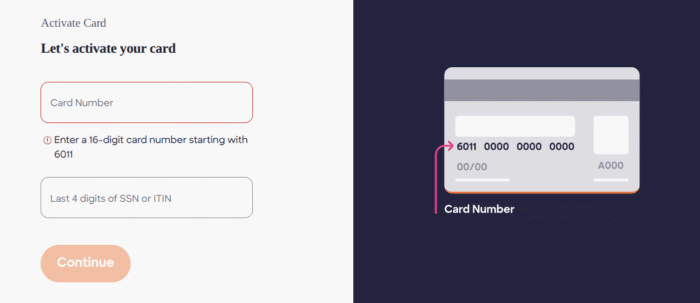
- Head over to the Discover Card Activation page. You’ll see the Let’s activate your card title and two boxes below it.
- Type your 16-digit card number that must start with 6011, and the last 4 digits of SSN or ITIN. Tap Continue.
- Now verify your identity by submitting your date of birth and ZIP Code.
- Just follow the prompts, and your card will be ready to use in no time.
Never share your Card’s PIN or SSN with anyone. Your PIN starts with the letter A, followed by the 3 numbers that you can find on the back of your Discover card.
Activate by Phone
You don’t need to open the website or access your account for activation, as the phone is another solid option that works without the Internet and doesn’t need any human interaction.
All you need to do is call 1-800-DISCOVER (1-800-347-2683) at any time, including holidays.
Next up, the system will ask you to provide your card number and verify your identity. Simply follow the prompts, and your activation will be complete once the system verifies your information.
The whole process just takes a minute or two and doesn’t need an agent. However, you can connect to a human representative by pressing “0” or saying “representative.
Activate Through the App
Want to manage your finances on the go? app is the best choice. It’s a quick and straightforward option too.
- First off, download the Discover app. It’s available on both iOS and Android stores. Make sure you download the official app.
- Launch the app and log in to your account using your username and password. New cardholder? You can register Discover in just two steps.
- Once you log in, tap on the activation prompt right on the home screen.
- Next, enter your credentials, such as your card number and SSN. The process will be quite similar to the online web.
- Now tap “Activate Card”. That’s it. Once it’s activated, you can use it anywhere Discover is accepted.
Via a Bank Branch
If you’re already heading to the branch, you can consider this method. Unlike others, it’s less common and may be obsolete for most people, but if you’re uncomfortable doing things online or over the phone, it’s an alternative.
Discover is primarily an online bank, so it has very few physical branches like Chime Bank.
However, if you opened your account through a partner bank or credit union, visit that location with a government-issued ID and your new card. A staff member will surely assist you with activation.
Also, Know How To Make A Discover Credit Card Payment
How do I know If My Discover card Is Activated?
It’s quite important to know whether your card is ready for transactions or needs some work. So when you use any of the above methods, you will see the confirmation message indicating that your card is activated.
In case you forgot to read the confirmation message, call Discover customer service to confirm your card status.
Or you can check it online or via apps by navigating to your credit card section.
Why Can’t I Activate My Discover Credit Card?
Are you unable to activate your card after receiving it? Let’s know the possible reasons behind this failure.
Still not processed
If your card arrived very recently — same day or the next morning — Discover’s system may not have flagged it as ready. Wait a few hours and try again.
Mismatched information
The most common reason. You’re entering your SSN or ZIP code slightly differently from what’s on file. Make sure you’re using the ZIP code tied to your account, not your current address if you moved recently.
Your account is on hold
Discover may put a new account on hold for a fraud review. This is rare, but it happens. Call 1-800-DISCOVER to ask if there’s a hold and how to clear it.
Incorrect Card Number
Easy mistake. Read the card number group by group: four digits at a time. One wrong digit fails the whole activation.
Internet Issue
If you’re on a work or public network with firewall restrictions, the Discover website may not load correctly. Try switching to your mobile data connection and using the app instead.
Old card not canceled
If you’re activating a replacement card after losing a previous one, call Discover directly. Some replacement activations don’t work through the self-service portal.
Browser or app issues
Try clearing your browser cache, switching browsers, or uninstalling and reinstalling the app. Saved login conflicts sometimes block the activation flow.
Frequently Asked Questions (FAQs)
No. Activation ensures that the actual cardholder is using it, not any random person. That said, you can only use it online or in retail after activation.
You can start using your card right after you get the confirmation message online or on the app. And if you make a phone call, the automated system will tell you about your card status.
This may happen. In case your card is lost and you didn’t activate it, you can call 1-800-347-2683 to report your issue. They’ll send you the replacement card and cancel the old one.
You don’t need an online profile at all. Choose a phone method and confirm with your card’s credentials. You may need to access your account in the app.
No, it has nothing to do with your credit score, as it doesn’t perform any inquiry to activate your card. Anyway, it’s a security step, not a credit check.
Wrapping Up
Activated your Discover Credit Card? If not, read through the whole article and pick your favorite way from Online, App, Phone, or Branch.
If you don’t have a smartphone or internet, a phone is the easiest option that doesn’t require you to talk to any representative.
However, if you want to activate your card quickly, go with the online or app method.
You can avoid visiting the branch if you don’t want to interact with people or stand in a queue.