If you’ve recently purchased a new Target Gift Card, you may be wondering how to check its balance.
Since Gift cards are a great way to express joy, without having to carry cash or a real bank account.
At the Target store, you get to choose from a motley of themes like Christmas, Pets, Birthdays, and so on.
You can buy cards for your popular brand, like Starbucks, Disney, or Apple, without a fee or expiration date.
Besides, for shopping outside of Target.com or in-store, it offers Visa, Mastercard, and Amex gift cards too.
In this article, I’ll not only walk you through checking a balance, but also outline some tactics that can be helpful.
So let’s get straight into the article.
Target Gift Cards: A Quick Glance
It is a Mammoth when it comes to retail chains, and millions of users purchase through it, both offline and online.
So, Gift cards are also part of their sales strategy that draws all types of people to express their emotions.

It offers a wide range of eGift and physical gift cards to shop solely at Target or across different brands.
Aside from that, it has Visa and Mastercard gift cards for shopping anywhere in the world, issued by Pathward, N.A., Member FDIC.
So, whether you want to redeem anything at the PlayStation, book a beach house at Airbnb, subscribe to the Apple Store, or give someone a Roblox, Target has loads of options to try.
So, you just pick one card that suits your theme, reload it once, and for the last, choose the delivery option to get it delivered in no time.
Unlike a credit card, it has no fee, is non-reloadable, and non-expirable, making it the most convenient option.
However, some cards that support Visa or American Express Levy a one-time fee at the time of purchase.
How To Check Your Target Gift Card Balance
Via Online
Got one for a special occasion like Christmas, birthdays, or holidays? Then you must have it delivered to your email, text, or mail.
Even if you’ve already applied the card number and access code at Target.com or In-store, you can check your available balance here.
- Head to the Target gift card balance page and access your account.
- Once you’ve landed on the page, you’ll see the two boxes. Just enter the details you’ve received with your card.
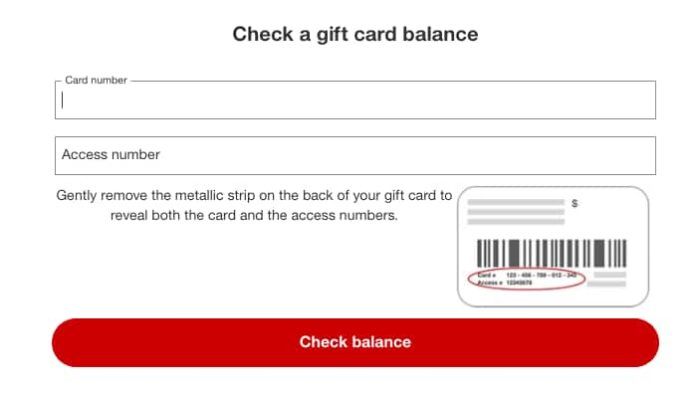
Next, tap the Check balance button to see your available cash.
The best part about such Gift cards is that they don’t have any expiration date. You can use them as long as you can retain the funds.
Via App
Have you installed the Target app? If yes, follow the steps below.
- Launch the app from the homescreen of your smartphone.
- Next up, tap the “My Target” option on the bottom bar corner.
- Now, click on the Settings icon placed at the top.
- You’ll see the Gift Card option under the My Account section, tap it.
- Once you’re inside the page, you can add a new or check your current gift card balance.
At In-Store
If you visit a Target store often, you can take a look at these steps.
- When you visit any Target in-store, you can head over to the counter and have your balance checked.
- First off, give your gift card to the cashier after shopping.
- The cashier will collect the payment and provide you with a bill that shows the available funds printed on it.
- Or you can ask the person directly to show your remaining capital.
Check Your Target Gift Card Balance (Without Sign in)
If you’ve your card details, such as the card number or Expiration date, you can access your account and check your balance.
Cardholders can find their details on the back of their card, and on the mail for virtual cards. So, let’s know step-by-step –
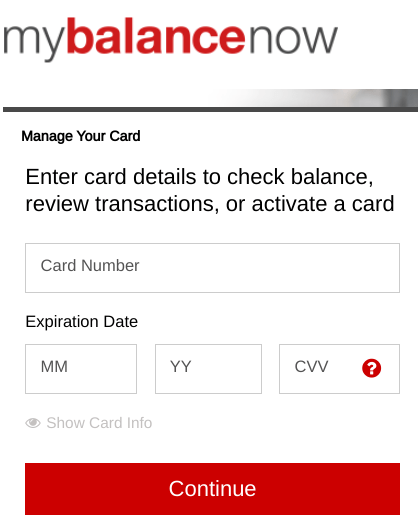
- Navigate to mybalancenow.com. Ensure you’re using a popular search engine, such as Safari or Google Chrome, for a smooth experience.
- Now, right after visiting the page, you’ll see the login box. Simply enter your 16-digit Gift card number, CVV, and the Expiration date.
- Once you submit your credentials, click “Continue” to manage your account, like checking your balance, transactions, or activating a card.
- Your credentials are not case-sensitive, but make sure they’re valid and accurate.
So, if you’ve purchased a Visa gift card from Target, you can check your balance using the link above. If your card has expired, you can contact the company’s support team to request a replacement.
However, the balance in it doesn’t expire, so you don’t have to worry about buying a new one.
Why can’t I check my Target Gift card balance?
When you try to enter your card details but encounter an error or invalid details, it could have different reasons.
One of the most common reasons could be that your card number or Access code is not valid. In such a case, double-check your credentials before accessing your account.
Another reason is expiration. Ensure that your payment network cards are active and have a sufficient balance to make a payment.
Again, you can appeal for a replacement if your card has expired or been lost with an unused balance.
Even though the above factors are not the issue, you can bump into an issue if your internet connection is poor or your browser is buggy.
Can I Reload My Target Gift Card?
No, you cannot reload your card, as it’s a one-time purchase card that can only be recharged at checkout.
So, once you’ve exhausted its balance, you’ve to buy another one and follow the same steps to use it.
As the name suggests, they’re the gift cards that you can offer to your closed ones for their birthdays or other events, unlike a traditional bank card.
However, if you want a reloadable card, you can opt for a Target Red Card or any other credit card that fits your needs; they’ve fees attached.
Frequently Asked Questions (FAQs)
No, Target-only gift cards don’t have any fees or expiration dates. However, Visa, American Express, and Mastercard Levy a one-time fee.
Unfortunately, Target doesn’t provide any replacement if you forget your credentials. However, you can get a new payment network card with an unused balance. You must jot down your card details or save them in a safe place.
It’s not a debit card that you can insert into an ATM to access your cash. So Target eGift or physical cards require online access. However, you can visit any in-store and ask a cashier to check your funds.
Log in to your Target account and navigate to the Active Gift Cards under the My Account section. Tap the one you want to check.
To redeem or activate, go to the Settings and add your new gift card details, such as your Access code and Card number.
Wrapping it Up
That’s the end of the article. I hope you liked it and explored various ways to check your Target gift card balance.
It’s a straightforward, yet convenient process when you keep your credentials ready.
However, you’ve to save your credentials or write them down, as there is no replacement for lost cards.
If you want to check your balance for a payment network gift card, such as Visa or American Express, you can visit mybalancenow.com directly.
Besides, Target-Only cardholders can access their Target shopping account and follow the instructions mentioned above.