Trying to pay your Discover Credit card bill? You’ve landed on the right article. Why bother? Many people in the U.S miss their payment date, resulting in late fees and a bad credit score.
That said, it’s vital to keep track of your due dates and payment methods for a faster, smoother experience.
However, Discover offers a host of payment options that make billing so simple.
So, without any further delay, let’s dive into the article and decode all the methods step by step.
4 Ways to Pay Your Discover Credit Card Bill Online
Let’s explore how many ways you can refill your credit card step-by-step. Let’s get started.
Pay Your Bill Online
If you’re comfortable with using online devices and the internet, it’s the best option you can go for. It’s fast, reliable, and convenient.
All you need is your personal device (Laptop, Tablet, or Mobile) and an internet connection. This procedure processes your transaction within minutes.
Here’s how to do it:
- Head to the Official Discover website and click the Login button resting on the navigational bar.
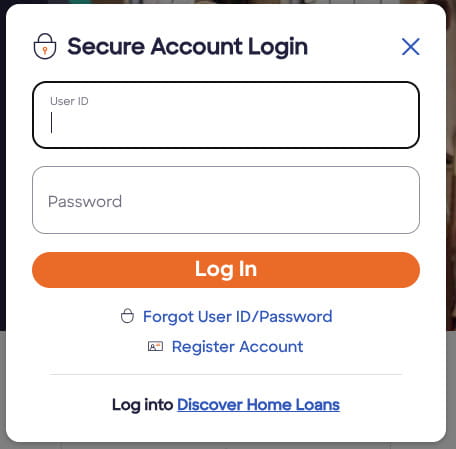
- You’ll see the login pop-up. Just enter your userID and password and hit Log in. You can create your account using your Card number and the last four digits of your SSN. If you already have one, ignore it.
- Once you click Log in, you’ll be redirected to your Account dashboard.
- Tap “Make A Payment”. It can be under the balance section.
- Next, choose an amount, select your bank account or another payment method, and initiate a transaction.
- Once payment is confirmed, it will show up in your Discover account within a few minutes.
If you don’t want to pay the bill now, you can schedule a payment for tomorrow or any other date. But make sure it’s before the due date to avoid late fees.
It’s worth noting that using a checking or savings account doesn’t levy any charges, unlike credit cards.
Online payments are free when you use a checking or savings account.
Pay Bill Using the Mobile App
If you go-to person who hardly stays at home due to work, this option is the best option. Discover offers an Android and iOS app to manage finances all in one place.
So, here is how to use it:
- Launch the Discover app and log in to your account using your credentials.
- Tap Pay Bill or Make a Payment from the payments tab, which is on the bottom navigation menu.
- Select “Pay” and choose your amount type, and proceed to the transaction after linking your bank account.
- After payment, you’ll receive a confirmation right in your email.
So compared to a browser, the app lets you check your balance, track history, and more without signing in repeatedly.
Make a payment by Phone
If the above options don’t seem reliable or are not working, you can pay your bill using your phone, without the internet. However, it may not feel convenient, but it’s still an option.
So you have to call the Discover’s customer service number that you can find on the back of your card. Simply answer the questions asked by the automated machine and representative, and follow the prompts to make a payment.
In case you have no cards with you at that moment, you can call this general number – 1-800-347-2683. Maybe someone will connect with you to solve your query.
However, you must have your Credit card and bank account details in place.
Usually, the payments made through phone process on the Same day if there is no bank holiday.
Pay by Mail a Check
It’s what you would like to avoid at any cost. It’s the least reliable and most time-consuming of all the above methods.
Anyway, if you still want to send a check or money order, you have to follow the steps below.
- Write your Discover account number on the check.
- Include the payment coupon from your statement if you have it.
- Mail it to one of the addresses shown below or on your billing statement.
PO Box 6103 Carol Stream, IL 60197-6103
PO Box 45909 San Francisco CA 94145-0909
PO Box 70176 Philadelphia, PA 19176-0176
PO Box 71242 Charlotte NC 28272-1242
To avoid late fees, consider sending it at least 7 to 10 days before your due date.
Explore: – Best Ways to Pay Your Kohl’s Credit Card Bill
How To Set Up Discover Automatic Payments
It’s the most efficient feature to automate your Discover credit card payments and avoid late fees. If you’re a regular payer but don’t have time to access your account, then this option will be a lifesaver.
It’s a one-time setup that allows you to manage your bill for as long as you want. So here’s how to set it up.
- Head over to your Discover account or launch the app.
- Navigate to “Payments” and select “Automatic Payments.”
- Choose the amount type. You can select minimum due, statement balance, or a fixed amount.
- Link your bank account and confirm payment.
- Select the date when you want to pay your bill.
Once you finished setting up, Autopay will automatically deduct the chosen amount from your linked bank account. It won’t ask you for your permission every time, so set up your bank, date, and amount carefully.
Why Pay Your Bill on Time?
Paying on time is not only good for avoiding late fees or penalties, but it also helps you improve your credit score and keeps your account in good standing.
So if you don’t pay off a bill, it will increase your APR and affect your credit score, resulting in poor loan offers with high interest rates.
So, it’s quite important to pay your Discover credit card bill during the billing cycle or due date.
To stay on track, set payment reminders or enroll in automatic payments. Even paying a few days early can give you extra breathing room.
What if You Miss a Discover Credit Card Payment?
Just like any other credit card company will do, your interest will build up gradually, and late fees will knock on your door.
What’s worse is that if it is more than 30 days, your account could be reported to the three major credit card bureaus, which in turn can downgrade your ability to take out good loans.
However, there is a catch: if it’s the first time you failed to pay on time and got charged a late fee, you can waive it after contacting the customer support team.
Again, it’s crucial to pay before the deadline to avoid overwhelming charges.
Can You Pay a Discover Credit Card with Another Credit Card?
In most cases, you can’t directly pay your Discover credit card with another credit card.
You may have two indirect options:
Cash advance: You take a cash advance from another credit card and use it to pay Discover. This usually comes with high fees and immediate interest.
Balance transfer: You move your Discover balance to another credit card that offers a lower or 0 percent introductory APR. This can help you save on interest, but there may be a transfer fee.
Balance transfers are usually the smarter option if you qualify.
Wrapping It Up
That’s how you can pay your Discover Credit card bill smoothly. You can opt for any method that seems reliable and fits your needs.
Online and app are the best methods that can process your payment faster than other methods, such as mail or phone.
Anyway, whatever you choose, ensure you’re not sharing your device and paying on time.
You can set up Autopay to streamline your experience and keep your account in good standing.
FAQs
Log in to your Discover account, click “Make a Payment,” choose the amount and bank account, then confirm the payment date.
Open the app, tap “Payments,” select the amount, choose your bank account, and confirm.
Call the number on the back of your Discover card to use the automated system or speak with a representative.
Mail your check to the payment address listed on your billing statement or find your corresponding address mentioned in this article.
It usually takes 7 to 10 business days. So mail it early to avoid late fees.
No. It does not charge a fee for payments made online or through the mobile app using a bank account.