Nothing is more intriguing than getting cash back from shopping at your favorite store. If you often purchase items from Academy stores, then you must take advantage of the offers that come with its credit card.
If you’re already using its card, then you must be saving tons of cash store-wide. But when it comes to settling bills, you should be more aware of paying them correctly.
In this article, I’ve piled up a few methods to help you pay your Academy credit card bill easily. So stay with me till the end of this article.
What is the Academy Credit Card?
In short, it’s a Mastercard credit card issued by Comenity Capital Bank, built for Academy users to rack up rewards, free shipping, cash back, and more.
Cardholders can manage their account using the Comenity Bank website, which is quite similar to other banks.
So if you’ve still not used your card, you can get $30 off your first purchase online or in-store.
If you’re opting to be an Academy cardholder, you must have a credit score of at least 640 or higher to increase your odds of approval.
The card comes with a few perks, and the best of all is its 5% off on store-wide purchases and free shipping with no minimum.
And if you manage to spend $500 on a single year using your Academy card, you get a $25 reward.
Ways to Pay Your Academy Credit Card Bill
You can pay off your bill in a few ways, including –
- Online (you need to access your account).
- By phone.
- By mail.
- Using AutoPay.
- In-store.
If you ask me, the most reliable and fastest method out of these options, I would choose the online method. However, every method works fine. Let’s explore.
Via Online
- Navigate directly to the d.comenity.net/easypay/academy/find-account. It’s the Comenity Capital Bank site built for Academy cardholders to manage their accounts.
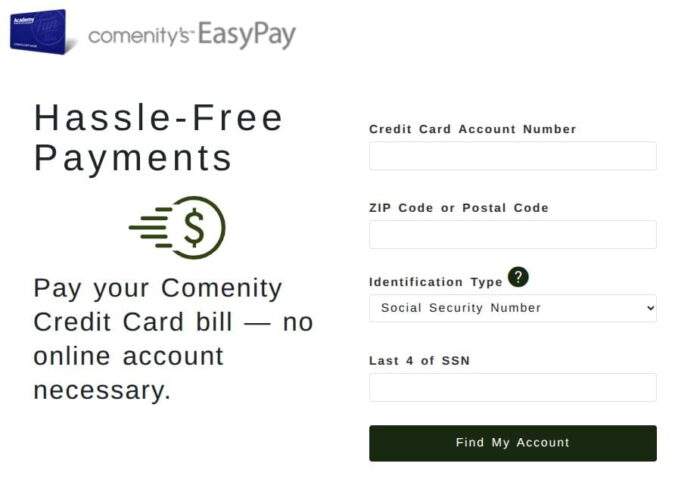
- Next, you’ll see a few options on the Comenity’s EasyPay page, such as Credit Card number, a zip code, and the last four digits of your SSN. Fill in all the details and tap Find My Account.
- Once your account is verified, you head to the payment page.
- Simply, enter the amount, select your bank account, and confirm to pay.
If your payment is successful, it will reflect in your account in a few minutes or within two business days. With EasyPay, you don’t need to access your account. However, if you want to manage your account, you have to sign in.
Pay by Phone
Don’t want to deal with the Internet to settle your bill? You can use your phone instead. Compared to the Online method, it’s a bit slower and requires some work, such as speaking with a representative and sharing your account details.
You have to provide your card number, bank routing number, and account number so your payment can be processed smoothly.
Simply call the phone number on the back of your card, and the representative will connect with you after a few automated prompts.
Generally, a payment can take a business day to show up in your account.
Via Mail
It’s another way that can help you with your credit card bill, but it’s the slowest of all.
That said, before sending it to the address on your billing statement, make sure it’s at least 7 to 10 days before your due date.
Also, ensure you’re writing the correct amount and account number on your check. If your mail arrives late, the issuer can incur a late fee.
Pay In Store
You can pay off your Academy credit card bill by visiting one of its Sports + Outdoors locations.
Just go to the service desk and ask the agent to pay your bill. It accepts cash, check, or debit card. You should avoid using your credit card for a hefty transaction fee.
However, some locations do not offer such a service, so it’s better to check with your location.
Why You Should Make Academy Payment Online?
Comenity Bank offers account management all in one place. All you need to do is access your account, and you can
- View statements.
- Check your balance.
- Make payments.
- Set up AutoPay.
- Update personal details.
Just head over to the Comenity Bank Academy website and sign in to your account. Not a member yet? You can register from the same page.
And if you use EasyPay, you don’t have to go through the sign-up process.
Due Date and Late Fees
Your due date shows up on your monthly statement, usually the same each month.
However, if you miss your payment:
- A late fee may be incurred.
- You may have increased APR charges.
- A credit score can be affected.
To make sure you don’t end up paying a fee, set up an Autopay to avoid paying late.
What Is the Minimum Payment?
If you don’t want to affect your FICO score, you can pay a minimum payment.
It’s the fraction of your borrowed cash you must settle to keep your account in good standing.
It’s usually:
- A percentage of your balance, or
- A fixed minimum amount.
But here is a catch: the minimum payment cannot help you with the total interest that you pay over time; it just keeps your account in good standing.
So, if possible, you should settle your bill faster to reduce the total interest or APR.
How to Set Up AutoPay
Fear of missing out on your payment? Then Autopay is the only solution. Not only does it help you avoid missed payments, but it also sets an automatic payment for any date before the due date.
Honestly, it’s the best feature if you are a disciplined payer that allows you to pay without accessing your account or manually entering bank details.
So here’s how to set it up.
- Sign in to your Academy account.
- Navigate to the payment settings.
- Choose Autopay.
- Enter the amount and link your bank account.
- Tap Confirm.
Once set up, payments will be drafted automatically on your due date.
Payment Processing Time
It’s quite crucial to know the processing time of your payment when using any above methods.
Here’s how much you might have to wait:
- For Online payments, it takes nearly 1–2 business days.
- Phone payments usually process the same day if submitted before the cutoff.
- Mail payments may take around 7–10 business days.
Payments made after the daily cutoff time may be processed the next business day.
What Happens If You Miss a Payment?
There will be a late fee for missing your bill after the due date. It won’t harm a lot if you miss once, but not paying consistently for months will increase APR charges, impact your credit score, and possibly terminate your account.
If you miss a payment, make it as soon as possible. Then contact customer service if you need help or want to request a fee review.
When To Contact Customer Service?
Sometimes, even after being consistent, problems may strike. However, there is always a support team to help you out.
You can reach out to the customer service if:
- Your payment didn’t post.
- You were charged a late fee.
- You need help setting up AutoPay.
- You want to retrieve your login details.
You can find the phone number on your billing statement or on the back of your card. Or call 1-800-285-1877 for activation and other queries.
Frequently Asked Questions
You can log in to your account and check your monthly statement, or call the customer service to know more. Try setting up an Autopay to avoid missed payments.
You may be able to request a different due date by contacting customer service.
If you use a debit card or bank account, you won’t have to pay a fee.
It will impose a massive $30 or up to $41 for subsequent failures. If you miss for the first time, you can appeal for a review.
You can use EasyPay online to settle your bill, as it doesn’t ask you to access your account. However, registered users can manage their accounts that guests can’t.
Wrapping it Up
Now you can know which method is best for you. If you’re an old-school person, a phone is the best choice, but it’s not that convenient.
Besides, mail and in-store are not people who have a lot on their plates. So, online is the most convenient way to process your payments faster and is quite efficient when you’re on the go.
And use Autopay so you can never skip a payment by mistake.