It’s no surprise that we love shopping, whether it’s online or in person. As such, there will always be a room between these domains, at least for years to come.
However, the idea of handling cash is such a valid point of argument when it comes to shopping.
Sam’s Club is one of the most popular wholesale retailers in the U.S that allows users to rack up rewards with its credit card, as other retailers do.
So, if you are already a cardholder and trying to make a payment or pay your bill, we’ve got you covered.
In this article, you’ll find the step-by-step methods and some tips that will certainly help you steer your credit history in the right direction.
Sam’s Club Credit Card: Glance
Sam’s Club is one of the largest wholesale membership clubs, offering bulk items at lower prices.
Founded in 1983, it is located in 44 states across the U.S, operating 600 membership warehouse clubs.
It offers a Mastercard® and a credit card, both issued by Synchrony Bank.
So to apply for any of it, you’ve to sign up for Plus Membership, which is quite a caveat compared to how other rivals offer such services.

Mastercard is specifically built to leverage rewards, while a credit card has no such benefits except a zero annual fee.
However, you can use both cards at Walmart or Sam’s Club, or whenever a Mastercard is accepted.
What’s best? When you’re a pro member and have a Sam’s Club Mastercard, you get up to 5% cash back at Sam’s Club.
So the platform provides a two-card version –
– The Sam’s Club Credit Card
– The Sam’s Club Mastercard
When you apply for a card, you will first be considered for a Mastercard, and if you’re not pre-qualified, you will then be considered for a credit card.
Since both have a similar login process, you don’t have to switch tabs or flip pages to get access to your accounts.
Different Ways to Make a Sam’s Club Credit Card Payment
Great, so you want to pay your Sam’s Club credit Card bill, which is quite a good move.
Well, there are multiple ways to pay, but you should opt for the fastest and convenient one to avoid unnecessary charges.
Making a Payment Online
No doubt, it’s the fastest option you can use, as it processes your payment almost on the same day.
To get started, all you need is a phone and the Internet. So let’s barge forward.
- Personal cardholders can simply visit samsclub.syf.com/. You’ll see the login box.
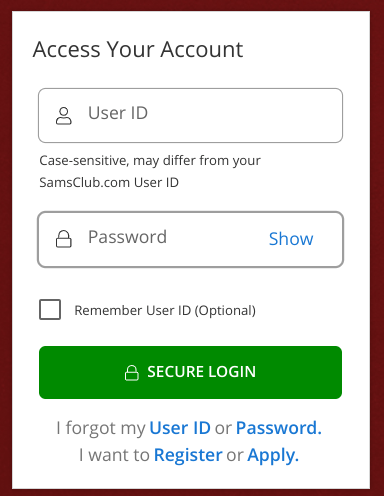
- Now submit your credentials, such as UserID and Password, to log in securely.
- After double-checking your details, hit the SECURE LOGIN button to access your account.
- Once successfully logged in, you can check your due, check a statement, or make a payment through a host of payment options like debit card, credit card, or a bank account.
In case you’ve forgotten your password or username, you can recover from the same page.
Paying Through the Sam’s Club App
Another cool way to pay your bill is via the Synchrony app, which is available to both Android and iOS users.
So, simply download the app from the App Store or Play Store, and follow the steps below.
- So, once you’ve downloaded the app, launch it from your smartphone’s homescreen.
- You’ll see the Sign In button right on the very first page of the app. Just tap it.
- Next up, search your account name (Sam’s Club). You’ll be redirected to Sam’s Club’s login page.
- Simply enter your credit card login details that you’ve used to access your online account.
- Once you’ve submitted all the credentials, you’ll be signed in and can manage your account within the app.
- Now you can make a payment easily through the app without having to access your account every time, until you clear your cache or data.
- If you’ve multiple Synchrony cards from different brands, you can link and manage all from one place.
Well, compared to online web access, the app is quite flexible, if you’ve more than one Synchrony account and want to access them without bothering about submitting credentials again and again.
Paying by Phone
Are you a phone person? Then this method is what you’re looking for. It’s easy, but it may take between 24 hours and to few days to settle your bills.
Since it’s not something you want to choose over any online method, it’s still an option.
If your Internet is down, and a due date is not close, then you can manage to settle your bills on the phone in a few minutes.
So here is how to get started:
- Make a phone call at – (800) 964-1917 for Consumer and (800) 203-5764 for Business credit card.
- And MasterCard personal account users call at (866) 220-0254, and Business Mastercard users call at 866) 220-2760.
- So call the phone number based on your account type. Now Automated call system will help you reach the customer representative.
- A representative may ask you to provide your card details to initiate payment. So you must keep your payment details handy before the call.
Paying In Person at Sam’s Club
If you like to handle payments in person, this method is all you need. So when shopping at any Sam’s Club in-retail store, you can ask a cashier at a counter to pay with your Sam’s Club credit card or Mastercard bill.
Most of the time, a cashier will help you, but it’s not certain that it will always work.
So, to get a job done, simply carry your billing card or cash and your Sam’s Club card and ask a cashier to pay your bill. That’s it.
Once it’s paid, you’ll receive a receipt printed at the place that you can show to the customer support team if payment is pending or not processed.
Paying by Mail
This is probably not something a new-age person will try. It’s not the fastest method, but it may work if done on time.
Since mail takes time to reach the location and it gets even worse when it arrives after the due date.
So, this is the least preferable option when it comes to paying your credit card bill. However, if you want to explore it, here’s how it works.
How to Pay by Mail
- Tear off the payment slip from your paper statement.
- Write your account number clearly on your check.
- Mail to the address printed on your statement or payment stub on your billing statement.
It should be mailed a week early so it arrives on time. In case you couldn’t find an address, reach out to the customer support by calling the number on the back of your card.
Why Paying a Bill on Time Is Crucial?
So whether you’ve a Sam’s Club credit card or a Mastercard, paying bills not on time can impact your credit score or your ability to take a loan.
On top of that, it levies a variable APR rate from 20% to 31.40%, and a 3% (up to $5) late fee.
It offers a maximum limit of $5,000 per year, which is quite a decent amount for fee accrual.
So, when you pay down your debt on time before a billing cycle, you won’t end up paying a hefty fee.
So, it’s advisable to reimburse your cash upfront or at least pay your minimum to avoid late fees, which could also later affect your civil score.
How To Set Up AutoPay
Scared of deadlines slipping by? Autopay has got you covered. It’s one of the most helpful features a company can offer.
Not only does it make it easier to make a payment by automating the process, but it’s also important to avoid fees.
So to enable Autopay for your Sam’s Club credit card, follow the steps below.
- Head over to the Synchrony website or the app and access your account.
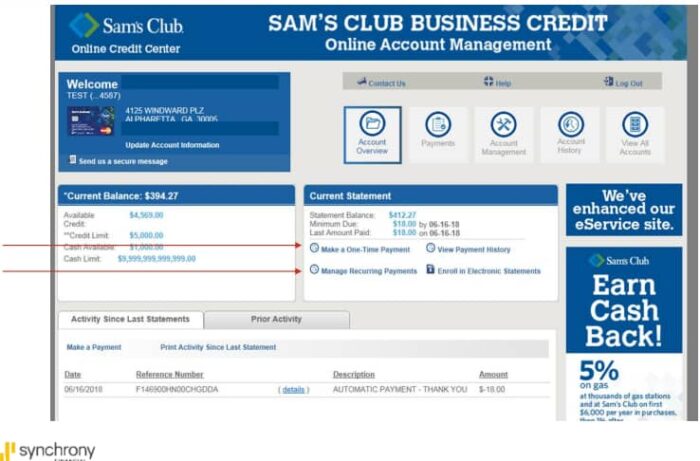
- Navigate to the payment settings and tap ‘Setup Autopay (Recurring)’ Payments or ‘One-time payment’.
- Now you can choose a minimum due, statement balance, or any custom amount that you want to pay every month.
- Next, set up your payment method, and you’re done. Now your payment will run automatically on the billing cycle, every month until you remove autopay.
Frequently Asked Questions
Yes. Synchrony allows adding multiple bank accounts.
No. Payments happen at Sam’s Club locations, not Walmart. However, you can use your card to pay at Walmart or any store that accepts Mastercard.
No. There is no fee for paying your bill online or via app.
Yes. You can schedule payments days or weeks in advance.
You can choose to pay as a guest at the login page to make a payment without signing in. However, you’ve to submit your card credentials.