Fan of J.JILL? Then you must be using its credit card to shop across the brand for numerous discounts and cashbacks.
Yes, you can use it to purchase from different brands, as it’s totally up to you.
Anyway, if you’re a new cardholder who doesn’t know how to make a payment or pay down a debt, this article can help.
You’ll also discover a few tips to keep your credit score healthy, so you never break the pattern of shopping frugally. Here we get started.
What is the J.Jill Credit card?
This women’s wear brand offers a Store-only credit card issued by Comenity Capital Bank, the Bread company.
Unlike Target or Lowe’s Credit cards, it doesn’t support payment networks like Visa or Mastercard.
That said, you can only use it to shop at J.Jill.com or in stores across the U.S, with 0% annual fee.
But you can pay the bill through your credit card, debit card, or bank account.
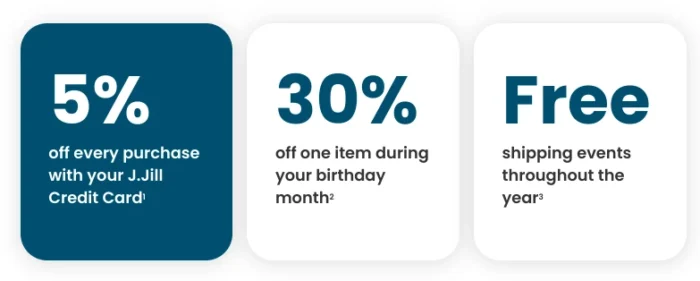
With 15% discounts on your first two purchases and 5% off on every purchase, it’s not a bad deal after all.
Aside from that, it has many perks that make the credit card a great buy. However, it has a high APR as high as 35.99%, which can vary depending on your credit history and FICO score.
The better your credit score, the better the APR rate you’ll get.
How To Make A J.Jill Credit Card Payment
There are a few ways to pay your J.Jill credit card bill. One of the most convenient ways is to pay online.
Other methods are phone, App, mail, and in-store. So let’s start with the most popular.
Via Online Website
- Head to the d.comenity.net/ac/jjill/. It’s a Comenity Bank website that issues J.Jill credit cards.
- Now enter your Username and Password you’ve created during online registration of your card. No account? You can create one by clicking on the “Register Now” text.
- Confirm your credentials, and tap “Sign in” to access your J.Jill credit card account.
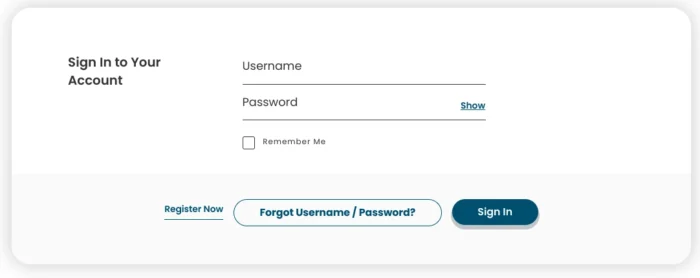
- So once you’ve submitted the details, you can easily access your account, pay your bills, view rewards, update your personal information, and more.
It’s worth noting that your credentials shouldn’t have any typos. In case you forget them, you can reset from the login page by clicking on the “Forgot Username or Password” option.
Via App.
You’re tired of logging in and out. You can manage your account using the Bread Financial App. So let’s explore how to do it.
- Simply download the Bread Finance app and launch it from the home screen.
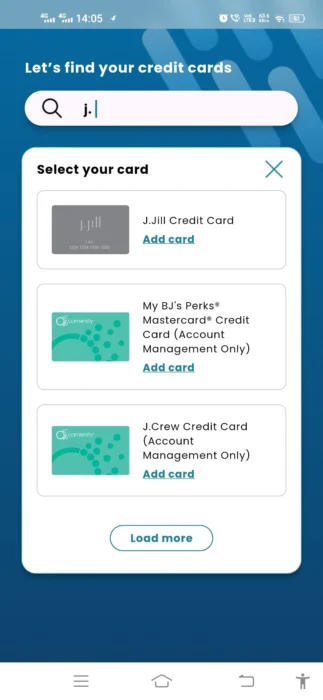
- Search for your J.Jill credit card and add it to the Bread Financial app.
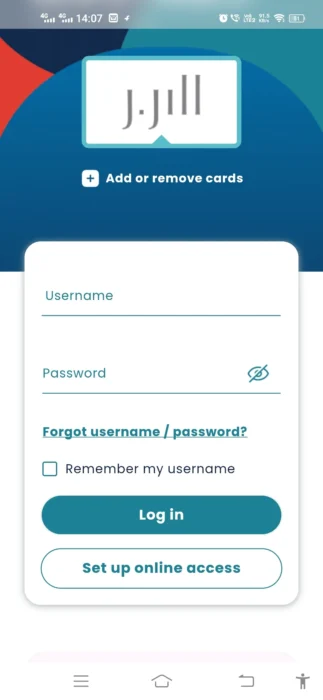
- Once you’ve added your card, you’ve to enter your Username and Password to log in. You can also set up an online account to access your account.
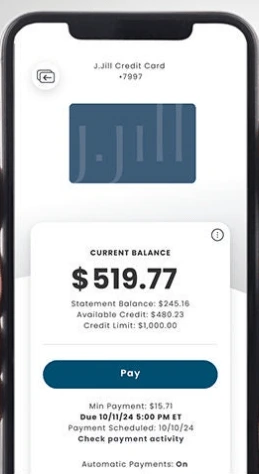
- Next up, tap the Pay button to pay off your outstanding balance or minimum due.
- You’ve to link your bank account or credit card, or debit card. To avoid paying it manually or paying a late fee, you can turn on automatic payment.
Pay via Mail
This is the slowest option in the list, which can take up to 10 days to reflect your payment in the account.
To make sure it arrives on time, you’ve to dispatch it at least 7 days before the billing cycle.
To make a payment, just write a check (no cash) that includes your 16-digit credit card number on the memo, and send it to the address below –
Comenity Capital Bank
PO Box 650965
Dallas, TX 75265-0965
Note: You must write the amount, include a payment slip or coupon, and your signature.
Pay over Phone
No Internet or a smartphone? No problem. You can make a payment via your phone, too.
All you need is your bank account or debit card. So before reaching out to a customer representative, ensure that you’ve your card details for both payment sources and credit cards ready with you.
This could be an automated call, but it will connect you to a real person who will assist you with the payment.
You can contact any of these phone numbers to pay your bill: (1.800.329.9713), (1-888-819-1918).
Via In-Store
Do you shop at J.Jill in-store? Then you don’t have to worry about accessing your account.
Simply, carry your debit card or cash to the store, and when finished shopping, ask a cashier to pay your bill or transfer the funds to your credit card.
Most of the time, it works, as it’s the secure way, but it requires enough funds in the giver’s account.
Once your payment is made, it should show in your credit card account in two days.
Don’t forget to take a billing receipt of the payment.
How To Reset a Username or Password?
You need to verify your account information to reset your credentials. Here’s how to do it.
- Navigate to the Forget username or password option on the login page, or you can directly visit JJILL Reset.
- You’ll see a few options such as Account number, SSN (last four digits), and Zip code. Fill them all in, and you’ll be redirected to reset your password or username.
- After completing all the steps, your credentials will be ready to use.
A Few Tips To Avoid Late Fees
Whether it’s a store-only or a full-fledged card, it charges fees for missed payments. So it’s crucial to keep tabs on your bills and pay down your debt before it’s too late.
Here are a few tactics you can follow to dodge charges against your J.Jill credit card.
- Set up Autopay: If you often forget to pay on time, you can set up autopay so it automatically deducts your payment from your bank account.
- Pay on time: It’s quite crucial to pay before the due date, before 5:00 p.m. ET, to avoid late fees. If you’re using a check, try to send it earlier.
- Track spending: How much cash you spend, or where it’s going, is essential to monitor. So make use of any popular budgeting app that keeps tabs on your spending.
- Don’t pay the minimum: Paying just the minimum won’t help clear your debt completely. So, ensure you pay in full or pay more than the minimum to avoid building up interest.
- Contact Creditor: If you have a good history of settling your debt on time, but somehow you couldn’t pay on time this time for some reason, you can appeal to waive your late fee as an overdraft.
Frequently Asked Questions (FAQs)
Yes, you can use your credit card that supports payment networks like Visa, Mastercard, and American Express. Besides, it lets you use a debit card and bank account (ACH) to make a payment.
Yes, it has the app, but not its standalone app. You can use the Bread Finance app to add your J.Jill card and pay its bill.
Both online and app are the most convenient and easy ways to make your payment. Simply enter your login details and access your account.
It will incur a fee (not disclosed) for not paying on time or after the billing cycle. You must set up an auto-pay so you don’t have to do it yourself every month.
No, you can only shop at J.Jill.com or store-wide, as it doesn’t accept Visa, Mastercard, or any other network.
Yes, you can pay your J.Jill credit card bill without signing up using Comenity’s easy pay. Simply submit your 16-digit card number, your Zip code, and your Social Security Number.
In such a case, ensure your credentials have no typos. If you’re locked out, you can retrieve your password and access your account. Also, to pay your bill without an error, you must double-check your balance and ensure that your card is active.
The Bottom Line
It’s time to wrap up this article. You’ve explored all the ways to make a J.Jill payment.
With detailed analysis and step-by-step explanation, it will be easier for you to grasp the key takeaways and choose the best method.
However, paying your bill online and through the App is the most convenient and fastest option.
You can go with the flow or what fits your needs. It’s totally up to you.