Are you an avid Disney fan who has watched almost every movie, from the old Mickey Mouse to the new The Fantastic Four: First Steps, or often visits Disney World?
Time has changed, and Disney has also grown up, since it doesn’t rely on its epic character, Mickey Mouse, anymore.
So, if you’re excited to experience its magical theme park or spend most of your cash on Walt Disney World, Disneyland, or Disney Cruise Line, then you must give its gift card a try.
Anyway, if you already have its gift card, then you should know how to check its balance, so you don’t face any payment issues later. So let’s get right into the article.
What Is a Disney Gift Card?
A Disney Gift Card is a reloadable prepaid payment card built to shop at the Disney website or anywhere that Disney owns. It’s issued by Disney Gift Card Services, Inc., which is a subsidiary of The Walt Disney Company.
You can only reload the physical card with a value between $5 to $1,000 at the locations that sell Disney cards.
Since eGift cards have a special purpose, they function almost the same. You cannot reload eGift cards, but you can link them to your e-wallet – which is not possible with physical gift cards.
However, you can carry a physical card with you without relying on the internet. Also, they come with over 60+ personalized designs, including holidays, characters, Disney movies, and more.
You can use this card for any transaction with anything the Disney company offers, including Disneyland, Disney resorts, Disney stores, and more.
The caveat is that gift cards don’t earn any interest because they don’t link to any bank account.
Also, they don’t charge any fee or expire, giving users more control over how to spend.
If you want an enhanced Disney experience with lots of perks, Disney gift cards are the best option.
How to Check Disney Gift Card Balance
Already started spending your cash? Then you must know how to check your balance before you encounter an insufficient balance error. So, let’s know step-by-step.
- Visit disneygiftcard.com and tap the “CHECK BALANCE” tab in the navigation menu.
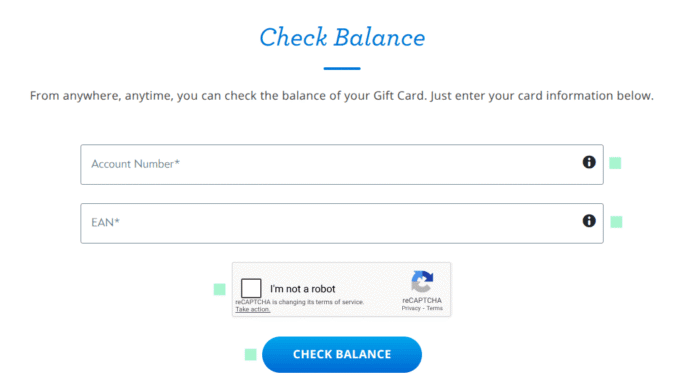
- Next, enter your Account number and EAN.
- You can find the Account number on the back of your card after removing the covering, or you can receive it in your email for an eGift card. Your EAN or PIN is located on the back of the card, too.
- Once you’ve submitted and confirmed your details, hit the CHECK BALANCE button. That’s it.
You don’t need to create an account or sign up to check a balance. However, if you manage multiple gift cards and want to track transaction history, you require a login.
Why You Should Check Your Disney Gift Card Balance
There is no hard rule that you should check your balance, unless you want to know how much cash is available to use.
If you shop often, it’s a must to keep tabs on your money, so you don’t run out of cash for things you want to buy.
It’s easier to check the balance than remember the amount left on your card.
Not only will it help you avoid future payment failures, but also keep you from frivolously spending.
Knowing your remaining balance also helps you plan better, whether you are buying tickets, food, souvenirs, or booking something special.
Best of all, it will help you reload your card in time, eliminating stress and giving you more time to use your balance wisely.
What You Need Before Checking Your Disney Gift Card Balance
If your card is activated, then you only need a few things.
- A Disney Gift Card or just the account number if you’ve jotted it down.
- A security code or EAN that you can find on the back of the card.
- Access to the email where you’ve received your eGift card credentials.
- A solid internet connection that doesn’t interrupt a process.
Where You Can Use a Disney Gift Card
A lot of users still don’t use the card correctly. If someone gifted you a Disney Gift Card, the very first thing you might want to know is where you should use it, right?
As the name suggests, it’s built for Disney. You can use it at Disney theme parks to pay for everything inside them, such as food, drinks, park tickets, and so on.
You can use it at a Disney resort hotel or campground that fits your needs.
You can use it to experience a cruise ship and buy anything it offers, including dining or onboard activities.
Last but not least, you can use your balance at Disney online stores to buy toys, clothing, collectibles, official merchandise, and more.
In a few words, it’s accepted at all Disney locations.
Tips to Protect Your Disney Gift Card Balance
It’s crucial to protect your Disney Gift card so that no one can access it without your permission.
Since it does everything a debit or credit card does, you should treat it as cash and keep it safe.
Avoid sharing your device or email that has your gift card details, as anyone can redeem it and use up your balance that you cannot Retreive.
That said, it’s advisable to monitor your balance sporadically to notice any unauthorized use.
You should only use the Official Disney website to check your balance or the phone number on the back of your card.
In case your card is lost or stolen, and if it has a balance, seek Disney customer support and request that they send a replacement card with the remaining amount.
Wrap Up
That’s there to it. Hopefully, now you know everything about checking your Disney credit card balance.
It’s just knowing where to go, more than how to do it. Because the process is quite straightforward.
Unless you want to check your transaction history, you can view your available cash without logging in.
If you’re stuck and facing any issues, you can read through the whole article or reach out to the Gift card support team.
FAQs
Yes, you don’t need to create an account to check your balance. All you need to have is your account number and EAN. If you have your credentials ready, you can head over to the official Disney website and click on the CHECK BALANCE button from the top menu bar. Now submit your details, and you can view your available cash without logging in.
However, it’s recommended to access your account to check your transaction history and manage multiple cards.
It may happen due to some reasons. You may be checking the wrong gift card, or your card has been compromised or used by someone else.
In any case, you should log in to DisneyGiftCard.com and check your transaction history. If you have multiple cards, consider combining them into one.
If you detect any fraud, you should reach out to the support team to escalate the issue further.
If you’re unable to check your balance even after entering the right credentials, you may have a cache issue. Clear your browser cache and try again. Or if you’ve forgotten your password or username, you can retrieve them through your MyDisney account. Besides, you can try refreshing the page or double-checking your Internet connection.
Yes, it’s safe when you access the official Disney website. You should avoid any other website that mimics the Disney user interface.
Also Read:
How to check your Giftcardmall balance
Happycards check balance guide